NordVPN vs ExpressVPN 2026 comparison

Choosing between two high-quality VPNs like NordVPN and ExpressVPN can be difficult. Both are famous for their blazing-fast speeds, reliability, and overall effectiveness.
However, although the two VPNs are top notch, there are some major differences between them that make them appealing to different customers. That’s why it’s vital to evaluate them side-by-side to see how they differ in the smaller details.
To do that, I teamed up with our research team and thoroughly tested NordVPN vs ExpressVPN in September 2025. We evaluated their speeds, security, server fleets, features, prices, and usability. We also focused on popular use cases like streaming and torrenting. After a thorough analysis, only one provider came out on top – keep reading to see which one is better in my opinion.
📢 LIMITED OFFER: Get 75% OFF NordVPN + 3 months free
NordVPN vs ExpressVPN at a glance
NordVPN and ExpressVPN have several similarities that are common among the best VPN services. The two utilize strong encryption to keep your connections secure, and have audited no-logs policies for increased reliability. They’re also easy to use and come with high-quality apps for various devices.
Choose NordVPN if you want the best balance of speed, security, and price. It's also more flexible with its larger server network and higher device connection limit.
Choose ExpressVPN if you want a well rounded, easy-to-use VPN that’s effective in any scenario. It’s pricier than NordVPN, but I consider its security, streaming, torrenting, and speed performance in roughly the same category.
| NordVPN | ExpressVPN | |
| ⭐ Rating: | ||
| 🥇 Overall rank: | #1 out of #33 | #5 out of #33 |
| 🖥️ Servers: | 9,200+ servers in 137 countries | 3,000+ servers in 105 countries |
| 📖 No logs policy: | No logs | No logs |
| 💵 Price: | From $3.49/month | From $2.49/month |
| 🔥 Coupons: | NordVPN coupon 75% OFF | ExpressVPN coupon 80% OFF |
| 🔒 VPN protocols: | OpenVPN, WireGuard (NordLynx), NordWhisper | Lightway, OpenVPN, IKEv2 |
| 🍿 Streaming services: | Netflix, Hulu, BBC iPlayer, Disney+, and more | Netflix, Hulu, BBC iPlayer, Disney+, and more |
| 🖥️ Platforms: | Windows, macOS, Linux, Android, iOS | Windows, macOS, Linux, Android, iOS |
| 📥 Simultaneous connections: | 10 | 14 |
| 💁🏻 Support: | Knowledge base, FAQs, email, 24/7 live chat | Knowledge base, FAQs, email, 24/7 live chat |

Main differences between NordVPN and ExpressVPN
Let’s quickly overview the most prominent differences between NordVPN and ExpressVPN in case you don’t care about the finer details too much.
Firstly, NordVPN has lower starting prices, making it the obvious choice for budget-conscious users. Internal testing also showed that it’s faster than ExpressVPN, but not by a significant margin. Additionally, it offers more servers and supports more simultaneous device connections on one account.
On the other hand, ExpressVPN is pricier, but it only has one subscription tier, unlike NordVPN. It also offers a unique Aircove router with ExpressVPN built into it. Lastly, it’s unclear how many servers ExpressVPN has, and one account supports only 8 device connections.
NordVPN vs ExpressVPN subscription prices
NordVPN is cheaper than ExpressVPN when comparing their starting prices. However, if you choose one of NordVPN’s pricier tiers, it becomes more expensive but has a lot more features. In contrast, ExpressVPN offers only one subscription plan, and the included benefits vary based on your subscription’s duration. The details between these two providers are quite different, which is why we have to discuss them separately.
NordVPN pricing
NordVPN offers four different subscription plans that you can sign up for a month, one year, or two years. Here’s a summary of all the details.
| Subscription tier | Basic | Plus | Complete | Prime |
| 2-year price | $3.49/month | $3.59/month | $4.99/month | $6.99/month |
| Annual price | $4.99/month | $5.49/month | $6.99/month | $8.99/month |
| Monthly price | $12.99/month | $15.29/month | $18.69/month | $17.99/month |
| Features | VPN | VPN, Threat Protection Pro, NordPass | VPN, Threat Protection Pro, NordPass, NordLocker | VPN, Threat Protection Pro, NordPass, NordLocker, NordProtect |
NordVPN starts at just $3.49/month, making it cheaper than ExpressVPN and pretty affordable in general. However, this price gives you the cheapest Basic plan, which only includes the most essential VPN features. It doesn’t even have Threat Protection Pro. Therefore, it’s much more advisable to go with Plus, which costs $15.29/month. With it, you’ll get Threat Protection Pro, NordPass, and Dark Web Monitor.
The third tier is Complete, which adds NordLocker into the equation. It’s a cloud storage service that enables you to securely store your most precious files and have access to them anywhere. The final tier is Prime, which includes NordProtect to protect your most crucial personal details from data theft. Optionally, you can also add a dedicated IP and Incogni with any plan.
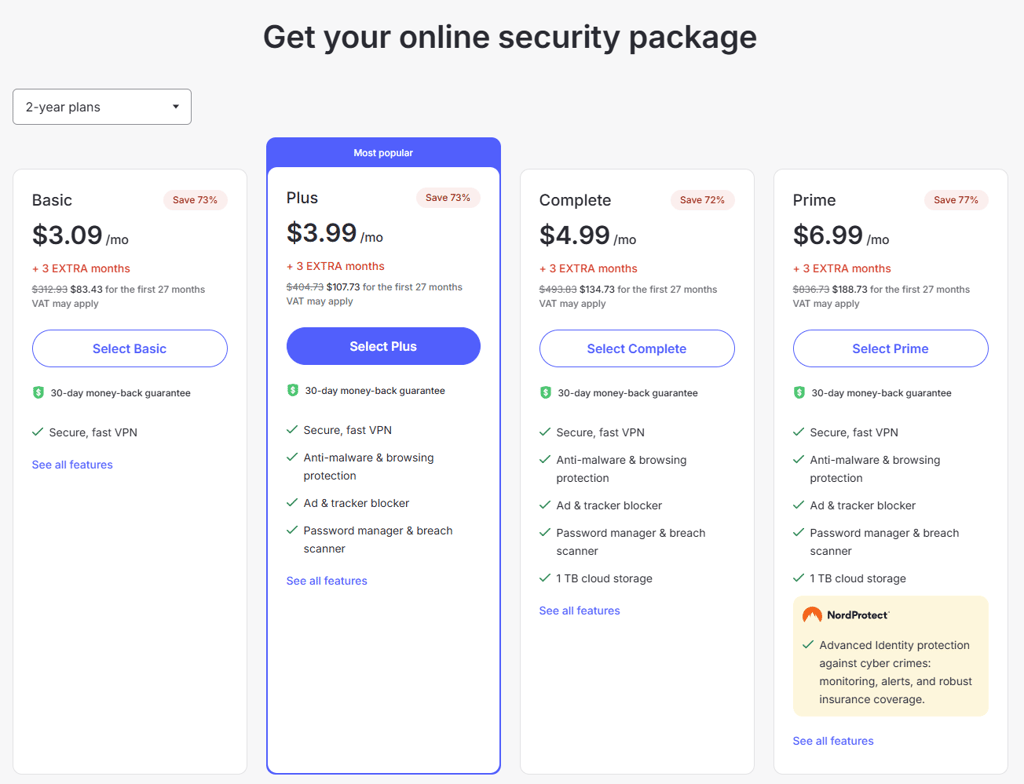
NordVPN’s payment options are pretty standard. You can subscribe using a credit card, PayPal, or Google Pay. Additionally, you can utilize cryptocurrencies using the CoinGate intermediary. All payment methods support the 30-day money-back guarantee as an added precaution against buyer’s remorse. Alternatively, you can claim NordVPN’s 3-day trial on the Google Play Store to test the service without a monetary commitment.
ExpressVPN pricing
ExpressVPN has a very different approach to pricing from NordVPN. It offers only one subscription tier, but the included features vary by its duration. Below is a table summarizing this strategy.
| Subscription length | 1 month | 1 year (+3 months FREE) | 2 years (+4 months FREE) |
| Monthly price | $12.99/month | $3.99/month | $4.99/month |
| Total price | $12.95 | $99.95 | $139.72 |
| Included features |
|
|
|
ExpressVPN’s most affordable subscription is the two-year plan, which costs $2.49/month. This option sometimes comes with 4 bonus free months of subscription time. Most importantly, it unlocks all of the provider’s features, including Data Removal and a Credit Scanner for users in the US. The total cost is $139.72 for the first 28 months, after which you’re switched to the annual subscription.
Speaking of which, the annual subscription costs $3.99/month, or $99.95 for 15 months (12 months + 3 months free). Compared to the two-year plan, it lacks Data Removal and Monthly Credit Report features, which are only available for US customers.
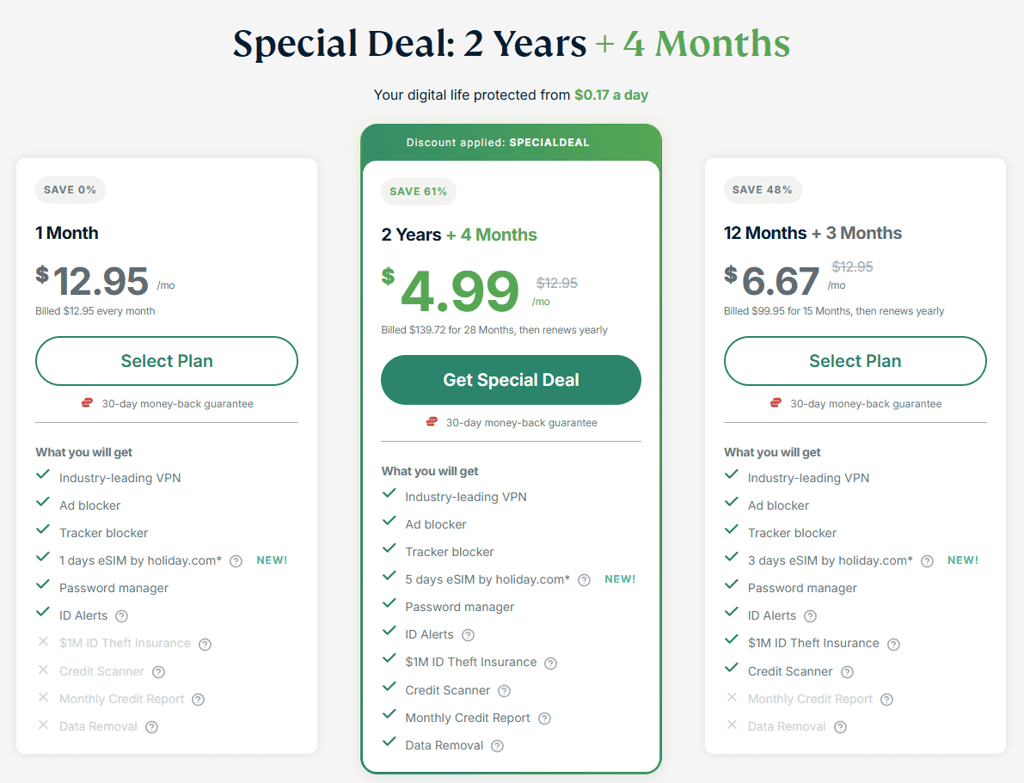
Lastly, the 1-month plan is priced at $12.99/month, almost the same as NordVPN’s Basic plan costs. It has the lowest number of features at the highest monthly price. Clearly, ExpressVPN wants to encourage customers to choose the lengthier subscription plans due to the abundance of its features.
ExpressVPN’s payment options are similar to NordVPN’s in that they’re pretty standard. Once again, you can pay using credit cards, PayPal, Google Pay, or Apple Pay. Meanwhile, privacy enthusiasts can pay using cryptocurrencies through the BitPay intermediary.
NordVPN vs ExpressVPN security overview
It should come as no surprise that NordVPN and ExpressVPN are very strong in the security category. The two VPNs utilize strong encryption, have numerous protection features, and have conducted multiple independent audits to confirm their commitment to protecting their customers.
| NordVPN | ExpressVPN | |
| Encryption | AES-256-CBC, ChaCha20 | AES-256, ChaCha20/Poly1305 |
| Kill switch | ✅ Yes | ✅ Yes |
| DNS leak protection | ✅ Yes | ✅ Yes |
| Hash | SHA-512 | SHA-512 |
| RAM servers | ✅ Yes | ✅ Yes |
| Outside of the Fourteen Eyes alliance | ✅ Yes | ✅ Yes |
| Independent audits | Last audited in December 2024 | Last audited in June 2025 |
Independent audits
NordVPN and ExpressVPN are some of the most extensively audited VPNs in the industry. Independent examinations are a reliable guarantee that VPNs stick to their no-logs claims. It’s crucial for auditors to verify this because otherwise there’s no way of knowing whether a VPN actually does what it claims to do.
As of writing this article, NordVPN has conducted five independent audits of its no-logs policy. The latest one was done at the end of 2024 by Deloitte Audit Lithuania. All of these audits confirm that NordVPN doesn’t keep logs of user activities. Besides that, NordVPN has commissioned technical security assessments as well, from firms like Cure53 and VerSprite, which focused on the provider’s desktop, mobile, and browser app security.
On the other hand, ExpressVPN has undergone a whopping 23 independent audits of its various technologies. Three of those were focused on the no-logs policy, while the rest checked other areas, such as ExpressVPN’s apps, server infrastructure, and proprietary technologies like its Lightway protocol. All the audits are conveniently laid out in the ExpressVPN’s Trust Center page.
Jurisdiction
Both providers are based in privacy-friendly countries that are nowhere near the Fourteen Eyes alliance. More precisely, NordVPN is based in Panama, while ExpressVPN is located in the British Virgin Islands. The two countries don’t have any mandatory data retention laws that would undermine either VPN’s commitment to privacy.
DNS leak protection
My testing showed that neither NordVPN nor ExpressVPN suffer from DNS leaking issues. However, previous reports show that ExpressVPN had issues with its Windows application that led to its split tunneling feature routing DNS requests incorrectly. The issue was quickly remedied through a patch, but the incident shows that even ExpressVPN can occasionally miss the mark.
NordVPN vs ExpressVPN: speed comparison
NordVPN and ExpressVPN both use proprietary tunneling protocols as their fastest options. This is quite exciting because most speedy VPNs rely on open-source options like WireGuard for top-tier speeds. In any case, we had to conduct some in-house speed tests to determine which provider is actually faster.
We measured both providers’ speeds in multiple locations worldwide to get an accurate view of how they perform with nearby and distant VPN servers. That way, it becomes clearer which one is actually faster on average. So, let’s look at a table summarizing our test speed findings. The baseline download connection speed was 940Mbps, while the baseline upload speed was 600Mbps.
| Country location | NordVPN download speed retention (Mbps) | ExpressVPN download speed retention (Mbps) | NordVPN upload speed retention (Mbps) | ExpressVPN upload speed retention (Mbps) |
| Australia | 689 | 601 | 90 | 75 |
| Canada | 717 | 679 | 158 | 183 |
| Germany | 840 | 830 | 480 | 544 |
| France | 841 | 786 | 448 | 438 |
| Japan | 685 | 384 | 74 | 74 |
| Netherlands | 849 | 790 | 557 | 530 |
| Sweden | 899 | 826 | 566 | 561 |
| Singapore | 647 | 660 | 81 | 107 |
| UK | 863 | 806 | 491 | 494 |
| US | 769 | 647 | 205 | 169 |
| Average | 779.9 | 700.9 | 315 | 317.5 |
As you can see, NordVPN was better at retaining high download speeds, while ExpressVPN was marginally better with upload speeds. The average download speed difference is about 80Mbps, which is rather significant. In contrast, the difference between average upload speed retention is only 2Mbps, which is barely noticeable.
NordVPN vs ExpressVPN feature overview
NordVPN and ExpressVPN come with an impressive array of features at their disposal. A quick side-by-side comparison shows that NordVPN offers more. Plus, you can unlock even more tools if you choose a pricier subscription tier, an option that’s unavailable with ExpressVPN.
| NordVPN | ExpressVPN | |
| Web filters | ✅ Yes (Threat Protection) | ✅ Yes (Threat Manager) |
| RAM-only servers | ✅ Yes | ✅ Yes (TrustedServer) |
| Stealth VPN | ✅ Yes (obfuscated servers) | ✅ Yes |
| Split tunneling | ✅ Yes (Android, Android TV, Windows) | ✅ Yes (Windows, Android, routers) |
| Smart DNS | ✅ Yes | ✅ Yes (MediaStreamer) |
| Dedicated IP | ✅ Yes (for additional price) | ✅ Yes (for additional price) |
| Meshnet | ✅ Yes | ❌ No |
| Tor over VPN | ✅ Yes (Onion over VPN) | ❌ No |
| Breach checker | ✅ Yes (Dark Web Monitor) | ❌ No |
| Specialty servers | ✅ Yes (Double VPN, obfuscated, P2P, Onion over VPN) | ❌ No |
One of the main factors that puts NordVPN ahead of ExpressVPN is the inclusion of Meshnet, specialty server categories, and Dark Web Monitor. Unfortunately, Meshnet will be shut down at the end of 2025, which will remove NordVPN’s slight edge over the competition. Regardless, NordVPN still has many aces up its sleeve that make it superior to ExpressVPN. Let’s go over some of their features individually to get a better understanding of their differences.
Split tunneling
Both providers come with split tunneling, allowing you to customize the VPN tunnel to affect various applications differently. You can choose which apps should skip the VPN tunnel or which ones should have exclusive access to it.
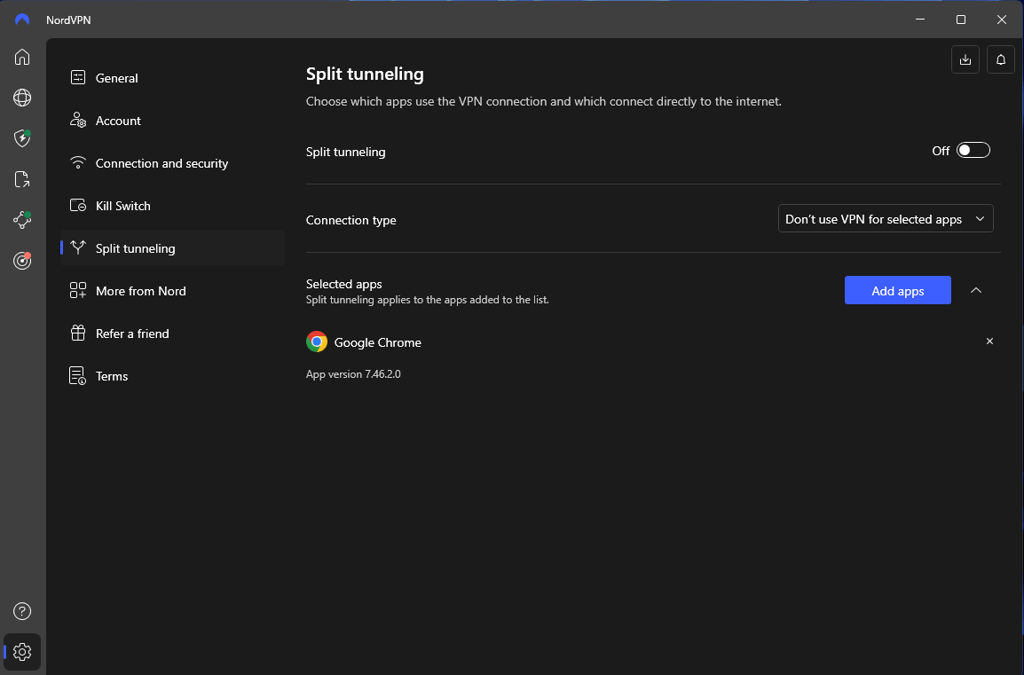
NordVPN’s split tunneling feature is available on many platforms: Windows, Android, and Android TV devices. It allows you to choose between two connection types (use or don’t use VPN for selected apps), which is as good as you can expect. One downside is that you can’t add IP addresses or websites, but you can use the browser extension for that. The feature was effective and easy to use during my evaluations.
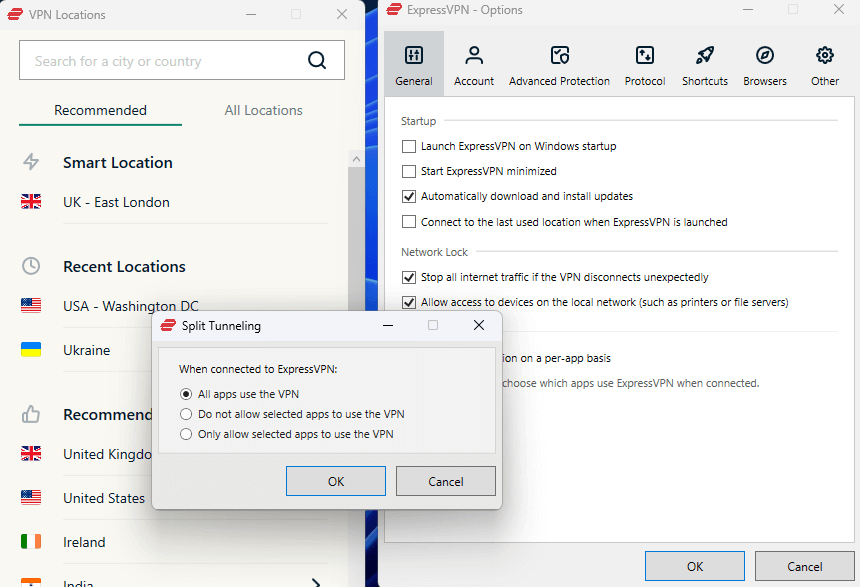
Meanwhile, ExpressVPN’s split tunneling is available on routers, Mac, Windows, Android, and even Linux. Thus, it is the superior option in terms of device compatibility. Its interface is not as refined as NordVPN’s, but functionally, it is exactly the same. Once again, there’s no option to add websites to the app’s split tunneling, but you can do that using the provider’s browser extension. Overall, the feature is easy enough to use.
Ad blocking
NordVPN and ExpressVPN come with ad blockers to improve your online browsing experience. NordVPN’s tool is called Threat Protection Pro, while ExpressVPN’s is named Threat Manager. Unfortunately, Threat Protection Pro isn’t included in NordVPN’s cheapest tier, which I think is a significant downside because ExpressVPN includes it with all subscriptions.
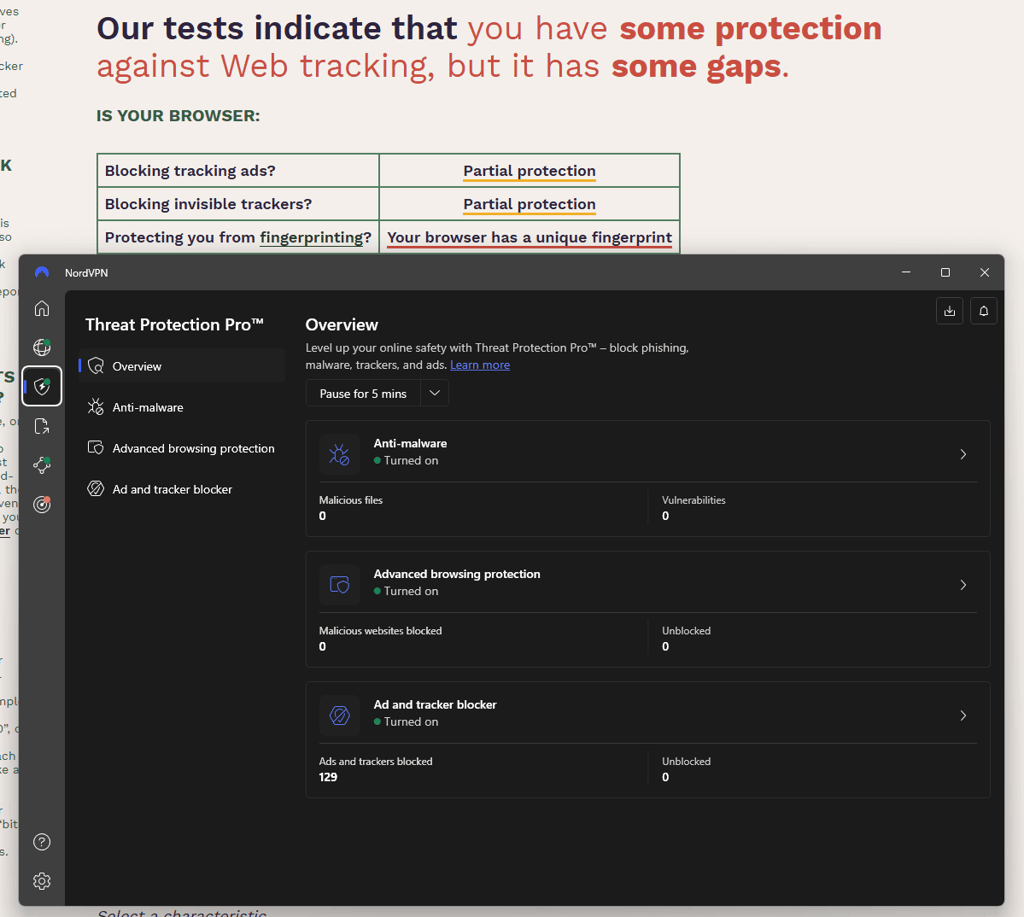
Threat Protection Pro is an impressive feature that protects you from a wide range of cyberthreats online. Besides malicious ads, it also eliminates trackers and even scans downloaded files for malware, meaning it offers better security than the average ad blocker. It is very customizable and shows how many threats it has blocked recently. In my experience, the feature is excellent at blocking ads, although EFF’s Cover Your Tracks tester shows that it grants only partial protection against tracking ads and invisible trackers.
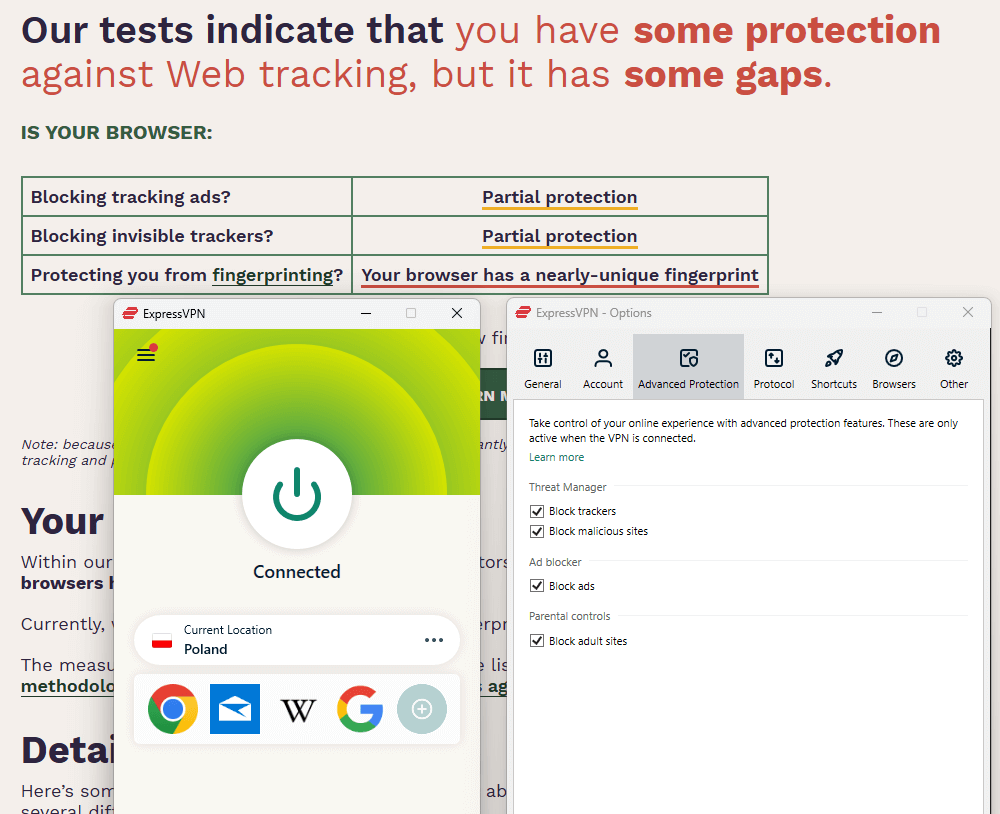
In contrast, ExpressVPN’s Threat Manager is pretty simple visually. It’s just a couple of checkboxes that you can enable in the Options menu. In my experience, it’s just as effective as NordVPN’s ad blocker, but I would prefer it if it gave some metrics about its recent performance. Moreover, just like Threat Protection Pro, Threat Manager wasn't entirely effective when analyzed by Cover Your Tracks.
Smart DNS
NordVPN and ExpressVPN come with Smart DNS capabilities to improve your streaming experience. It’s a tool that enables you to unblock certain streaming content on devices that don’t support VPN software. Namely, it’s a feature that you’ll use on smart TVs, gaming consoles, and other home entertainment devices. In other cases, you can use the dedicated VPN software for greater convenience and protection.
Both features worked well during my tests with NordVPN and ExpressVPN. I had no significant issues with the setup process, but I’ll admit that it wasn’t very easy either. Using the features isn’t particularly intuitive either, but that’s expected when comparing them to a full-fledged VPN app.
NordVPN vs ExpressVPN streaming performance
We tested NordVPN and ExpressVPN with many popular streaming platforms to see how well they fare in this widespread use case. The testing process involved connecting to VPN servers in various countries and trying to unblock content (movies and TV shows) exclusive to those regions. We tried this with popular streaming services like Netflix, HBO Max, Hulu, and more, to get a comprehensive picture of their overall performance.
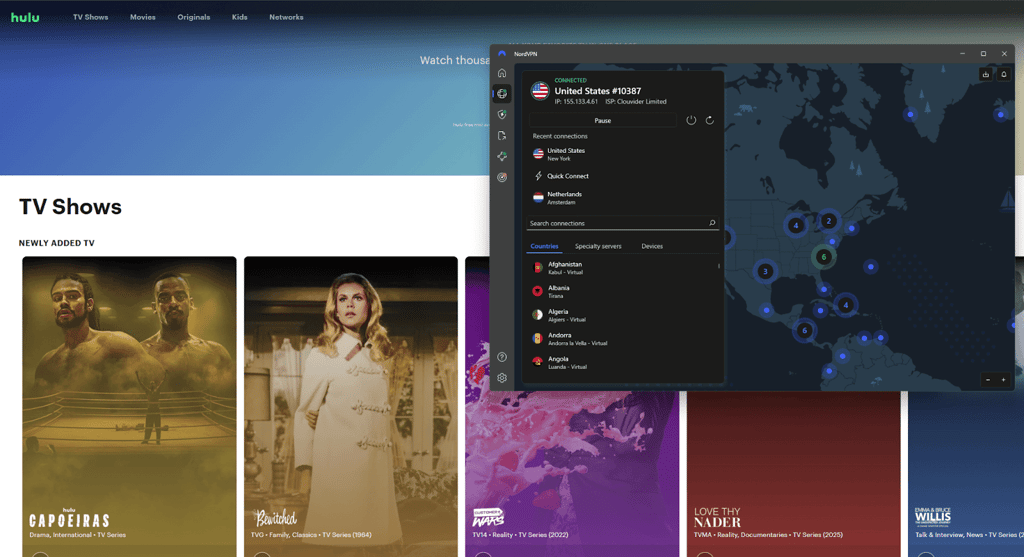
Our tests showed that NordVPN and ExpressVPN offer similar results when trying to unblock various streaming services. The two easily unblocked content from Netflix US and other regional libraries, for example, South Korea. In total, I was able to access around 20 regional Netflix libraries with NordVPN and ExpressVPN alike. The same can be said for other streaming platforms, such as BBC iPlayer, Amazon Prime Video, Disney+, and YouTube TV.
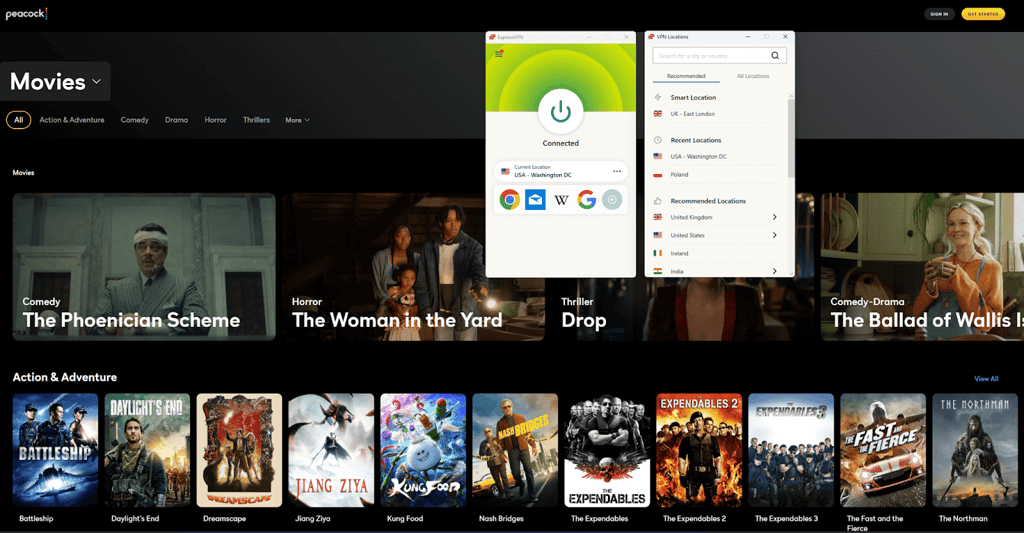
Unsurprisingly, both providers allow streaming on all of their servers. None are optimized specifically for this task, but that didn’t have any negative impact on my experience. Plus, both support the Smart DNS feature if you want to access content on devices that don’t support VPN apps.
NordVPN vs ExpressVPN torrenting performance
I tested NordVPN and ExpressVPN in the torrenting category by using both to download a 5.84GB Ubuntu file while connected to a nearby server. The similar testing circumstances allowed me to clearly see which one is better.
NordVPN gains a slight edge over ExpressVPN because it offers specialized P2P servers for torrenting. Combine that with the speedy NordLynx protocol, and you have a recipe for excellent performance. Ultimately, the large file was downloaded in 10 minutes.
Meanwhile, ExpressVPN doesn’t have any torrenting-optimized servers (or any specialized servers for that matter). Still, I was hoping that its Lightway UDP protocol would deliver excellent results. However, the file took 17 minutes to download, which is longer than with NordVPN.
As you can see, the results show that NordVPN is better than ExpressVPN when it comes to torrenting. The results will vary depending on your circumstances, but it’s clear that NordVPN’s wider server network and NordLynx protocol make it more suitable for P2P than ExpressVPN.
NordVPN and ExpressVPN server networks
NordVPN offers a superior server network than ExpressVPN. I can’t say whether it’s bigger since ExpressVPN doesn’t disclose its server fleet numbers. However, NordVPN covers more countries and offers a selection of specialty servers to improve your experience in certain situations.
| NordVPN | ExpressVPN | |
| Servers | 9,200+ | N/A |
| Countries | 137 | 105 |
| RAM-only servers | ✅ Yes | ✅ Yes |
| Virtual servers | ✅ Yes | ✅ Yes |
| Specialty servers | ✅ Yes (Double VPN, obfuscated, P2P, Onion over VPN) | ❌ No |
As for common ground, both providers offer RAM-only servers to ensure no user data is stored on hard drives for the long term. This is an excellent security feature that keeps customer data private even when the server hardware gets seized.
Naturally, both providers also utilize virtualization to provide more country variety. For example, NordVPN and ExpressVPN have Indian IP addresses, even though the country’s legislation requires VPN providers that have servers in the region to log and store user data. This can be avoided using virtual servers that offer IP servers in India.
NordVPN vs ExpressVPN: user experience
The research team and I evaluated the overall user experience that NordVPN and ExpressVPN apps provide. We focused our efforts on the devices we use daily, which are laptops and smartphones. However, we didn’t forget about other home entertainment devices, such as smart TVs, gaming consoles, routers, and more.
| NordVPN | ExpressVPN | |
| Supported OS | Windows, macOS, Linux (has a GUI), Android, iOS, tvOS | Windows, macOS, Linux (no GUI), Android, iOS, tvOS |
| Router applet | ❌ No | ✅ Yes |
| Other software and devices | Android TV, Fire TV, Roku, Kodi, Apple TV, Xbox, PlayStation, routers | Android TV, Fire TV, routers, Apple TV, Roku, PlayStation, Xbox |
| Browser extensions | Chrome, Firefox, Edge | Chrome, Firefox, Edge, Brave, Vivaldi |
| Simultaneous connections | 10 | 14 |
| Usability level | Easy to set up | Easy to set up |
Generally speaking, NordVPN is straightforward and easy to use. I had no issues installing the app on my main devices and understanding how everything works. The provider’s core features are easily accessible from the main menu. Moreover, I like that NordVPN’s apps are visually uniform across different devices.
Likewise, ExpressVPN’s apps are also polished and intuitive. The installation process is straightforward and just like with any other program. I find the provider’s apps minimalistic and free from clutter since most features are housed in the settings menu.
NordVPN and ExpressVPN testing methodology
When comparing different VPN providers there are numerous factors to keep in mind. Our research team conducted comprehensive tests and in-depth analysis to examine all aspects of VPN services, ensuring a fair and thorough comparison between NordVPN and ExpressVPN. We evaluated both providers across several key categories: price, security, speeds, and compatibility, to determine which one stands out overall.
To assess performance, we tested each provider’s speed, looking at download and upload speed retention, ping times, and how they performed across different locations worldwide. Security features were carefully analyzed, comparing usability and overall protection offered by each VPN. Pricing was considered as well, since subscription costs and available plans are often top priorities for users.
We also compared server fleets and global coverage, accounting for both the quantity and variety of servers, as well as any specialty server functionalities. The abilities of both VPNs for streaming and torrenting were tested to reveal which offers a better overall experience for these activities. Finally, we conducted hands-on tests with each provider’s apps to evaluate interface design and general ease of use, regardless of the user’s technical expertise.
NordVPN and ExpressVPN company backgrounds
It’s crucial to understand a company’s background, especially if you want to entrust it with your online browsing data. Knowing about its inception and history allows you to see whether it’s trustworthy and reliable.
NordVPN background
NordVPN was founded in Lithuania in 2012 by Tomas Okmanas and Eimantas Sabaliauskas. Their goal was to create a tool that allows people to enjoy the internet without censorship and surveillance. It all started with a single VPN server, but eventually transformed into an online security powerhouse. Now, the company is under Nord Security, which also runs NordPass, NordLocker, Saily, and more.
The company’s legal jurisdiction is in Panama to ensure its customers are free from unfavorable data retention laws. NordVPN adheres to a no-logs policy, which was audited five times by independent parties as of writing this article. Although the company experienced a security incident in 2018 involving a third-party data center, the issue was quickly resolved and didn’t lead to any significant risks for its customers.
ExpressVPN background
ExpressVPN was founded in 2009 by Peter Burchhardt and Dan Pomerantz. The company was acquired by Kape Technologies in 2021, along with CyberGhost and Private Internet Access. This move was concerning due to the company’s headquarters in the UK, but ExpressVPN claims to have operational independence. Crucially, ExpressVPN is based in the British Virgin Islands, which has an excellent reputation regarding confidentiality.
Like NordVPN, ExpressVPN sticks to a no-logs policy that was audited multiple times by independent companies like KPMG, PwC, and Cure53. It has also developed a range of proprietary technologies like Lightway and TrustedServer to enhance customer protection. However, the company came under fire when it came out that its chief information officer, Daniel Gericke, worked as a hacker for the UAE. The company released an official statement regarding this issue.
Conclusion
After a thorough comparison of features, speed, security, and value, NordVPN emerges as the clear winner over ExpressVPN. While both providers offer robust encryption, no-logs policies, and a global server network, NordVPN stands out with its advanced security tools, consistently faster speeds, and more affordable long-term plans.
| Category | NordVPN | ExpressVPN |
| Price | ✅ | ❌ |
| Security | ✅ | ✅ |
| Speed | ✅ | ❌ |
| Features | ✅ | ❌ |
| Streaming | ✅ | ✅ |
| Torrenting | ✅ | ❌ |
| Server locations | ✅ | ❌ |
| Ease of use | ✅ | ✅ |
Its innovative features, like Threat Protection Pro and Double VPN, give users extra peace of mind, while the intuitive app design makes privacy accessible for beginners and experts alike. For anyone seeking the best balance between performance, privacy, and price, NordVPN is the top choice.
However, that doesn’t mean you should overlook ExpressVPN. While pricier, it offers an approachable user experience with its minimalist design and simplified subscription structure. Plus, it’s just as effective as NordVPN in many crucial aspects and use cases, meaning you won’t miss out on much when picking ExpressVPN.
More CoolTechZone guides
FAQ
Is NordVPN better than ExpressVPN?
Yes, NordVPN is better than ExpressVPN. It offers faster speeds, more security features, and a wider server network at a lower price. NordVPN also supports 10 simultaneous device connections, while ExpressVPN only permits 14.
What are the downsides of NordVPN?
Some of the disadvantages of NordVPN include its 10-device connection limit and high renewal prices after the initial subscription period. Moreover, the free trial only lasts 3 days, which might not be enough to fully evaluate the service.
What are the downsides of ExpressVPN?
ExpressVPN is one of the pricier VPNs on the market, even though its feature selection isn’t particularly impressive. For example, it’s unclear how many servers there are in its fleet, and it only permits 14 simultaneous device connections per account.