
HideMy.Name VPN Review 2026: Decent VPN, but should you buy it?

HideMy.name is a VPN service based in Belize, and it operates under English law. The VPN service has only been around for a few years, although the parent company has been providing privacy services since 2006.
Here’s a highlight of HideMy.name VPN:
From the outside, HideMy.name appears to be a decent VPN service. This HideMy.name VPN review will look at the VPN’s strengths and weaknesses and compare it to market leaders such as ExpressVPN, NordVPN, and Surfshark VPN.
Pros & Cons
What can HideMy.name do?
From our tests, the VPN can unblock several streaming services. After testing a number of US servers, we found that the Clifton server was not blocked by Netflix.

However, the VPN somehow couldn’t unblock titles only found in Netflix US. The same thing happened with Netflix UK, and changing the VPN’s DNS (from Cloudflare) didn’t help. This makes the HideMy.name VPN not ideal for Netflix as the whole point is unblocking geo-restricted titles. If you’d like a streaming VPN, we recommend that you check out the best VPNs for Netflix.
Nevertheless, we were successful in unblocking BBC iPlayer.
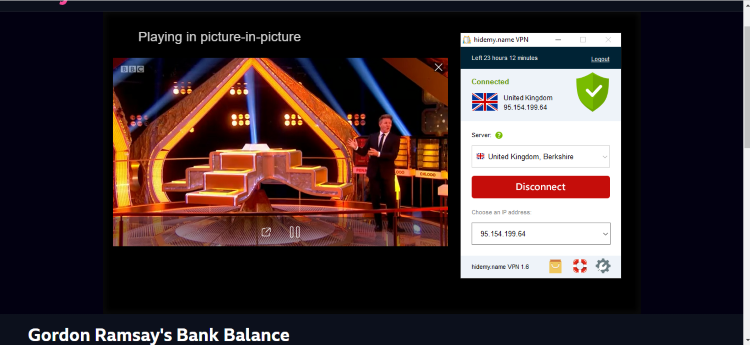
Is HideMy.name Secure?
Identity Cloaker is a secure VPN. This section looks at what the VPN has to offer in terms of privacy and security.
Privacy
Being Incorporated in Belize is good for privacy as the country is beyond the reach of the 14-eyes alliance. This is a good move to reduce external interference, and HideMy.name supplements it with a good privacy policy.
The VPN states in their privacy policy that they do not monitor or log browsing behavior. Further, “All the data you use remains anonymous and not connected to your real, public IP address.” When it comes to connection logs, the data collected is non-persistent and is cleared every few hours.
During sign-up, the only data collected from you is your email address, which is used to send the HideMy.name VPN key. Your account is then associated with a randomly generated username and a non-public IP address for troubleshooting purposes.
Overall, this is a good practice governed by a great privacy policy.
As for the reliability of the apps, the VPN has a DNS leak protection feature to prevent leaks. When we tested several servers, we didn’t find any leaks.

Security
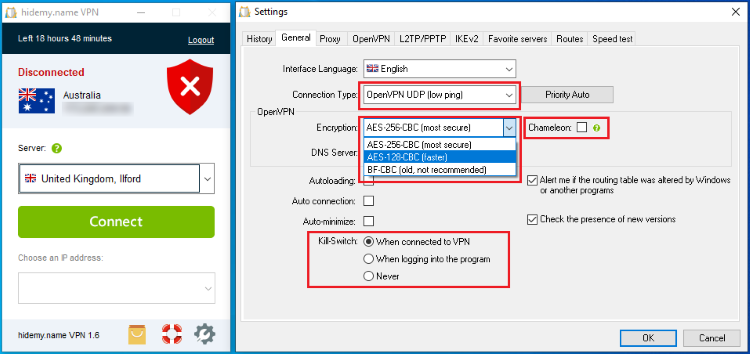
HideMy.name VPN also does well in terms of security. The VPN uses AES 256-bit encryption which is considered foolproof. However, although this is enabled by default, HideMy.name also allows users to determine the level of encryption they’d like to use. You can choose between AES 256-bit CBC (secure), AES 128-bit CBC (faster), and BF-CBC (old, not recommended).
HideMy.name VPN Features
Identity Cloaker lacks the advanced features offered by top-tier VPNs such as NordVPN and Surfshark, but it still has an array of decent features.
Multiple Protocols: The VPN allows you to choose between OpenVPN (both UDP & TCP), IKEv2, L2TP, and PPTP
Kill Switch: This feature shuts down your internet connection whenever you lose your VPN connection, such as when changing a server. You can choose whether it should work when you are connected to the VPN or when you log in to the program.
Chameleon: This is a stealth feature that offers obfuscation capabilities for users in countries that block VPN connections.
DNS Leak Prevention: This privacy feature prevents any possible DNS leaks when you connect to a poorly configured server.
Bypassing Websites: HideMy.name lets you bypass some websites that you don't want to encrypt, for example, banking sites.
Dedicated IP address: You can rent a personal IP address and curate your own online profile. This avoids any blacklists and unnecessary captcha requirements.
Proxy List: The VPN provides proxies that you can use on your browser. You can find the HideMy.name proxy list on the VPN website.
HideMy.name Network
The HideMy.name server network is made up of 0 servers, spread across 82 cities in 37 countries. These servers are mostly found in Europe, so you may not connect to some regions. If you’d like a world-wide network, you can look at ExpressVPN, which has 3,000+ VPN servers spread across 160 VPN locations in 105 countries.
Does HideMy.name support torrenting?
HideMy.name states that they “do not prohibit the use of p2p and torrents.” However, P2P ports are closed by default on some servers, and the VPN doesn’t highlight the servers that allow torrenting. Further, they advise users not to leave files for distribution after downloading them to avoid traffic congestion.
If you are a fan of filesharing, you can look at some of the best VPNs for torrenting. A highlight among them is NordVPN which has dedicated torrenting servers.
Pricing & Plans
HideMy.name VPN provides six subscription options, whose only difference is the subscription length. Here’s a breakdown of the plans:
- 1-month plan: Costs $11.00 a month.
- 6-month plan: Costs $5.00 a month, billed as $4 every 6 months.
- 1-year plan: Costs $4.00 a month, billed $36 every 12 months.
- 2-year plan: Costs $2.5 a month, billed $60 every 2 years.
- 3-year plans: Costs $2.4 a month, billed $86 every 3 years.
- 5-year plans: Costs $2 a month, billed $120 every 5 years.
Overall, the VPN is well-priced.
Supported payment methods
HideMy.name supports bank cards, PayPal, Google Pay, WebMoney, and Cryptocurrency. Accepting Bitcoin and other cryptocurrencies is good for users seeking anonymity, and it supports the VPN's policy of collecting minimal information.
Does HideMy.name have a money-back guarantee?
All HideMy.name purchases are protected by a 30-day money-back guarantee.
Does HideMy.name have a free trial?
HideMy.name offers a free trial on their website. This trial is valid for 24 hours, and it provides 500 MB bandwidth and 70% of the servers. You can extend it by clicking a buy button displayed at the bottom of the app.
Getting started with Identity Cloaker
Since HideMy.name offers a free trial service on their website, it’s advisable you try out the VPN and only purchase it when you are satisfied with the service offered. You can start using the VPN by providing your email address, and you’ll receive a license key that you enter on your apps.
Which devices does HideMy.name Support?
HideMy.name apps are downloadable on the main page. You can install the VPN on Windows, macOS, Android, and iOS. You can set it up on the router to encrypt your entire network.
Ease of Use
While testing the apps for this HideMy.name VPN review, we installed HideMy.name on Windows 10. The VPN's installation files are relatively small (less than 10 MBs) and easy to install. Here's what the VPN app looks like.

You can connect to a server with a single click using the Connect button. You can also select the server you’d like to connect to.
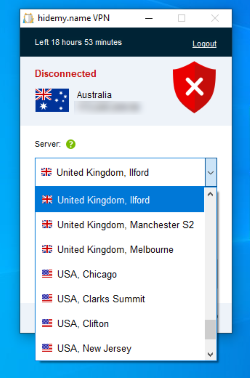
If you want to customize your connection (which is always a good idea), click the settings button on the bottom right corner. Another window that gives you several options will open.
Under the General tab, you can select your protocol, choose encryption strength, activate the kill switch, and even select the Chameleon (stealth) option.
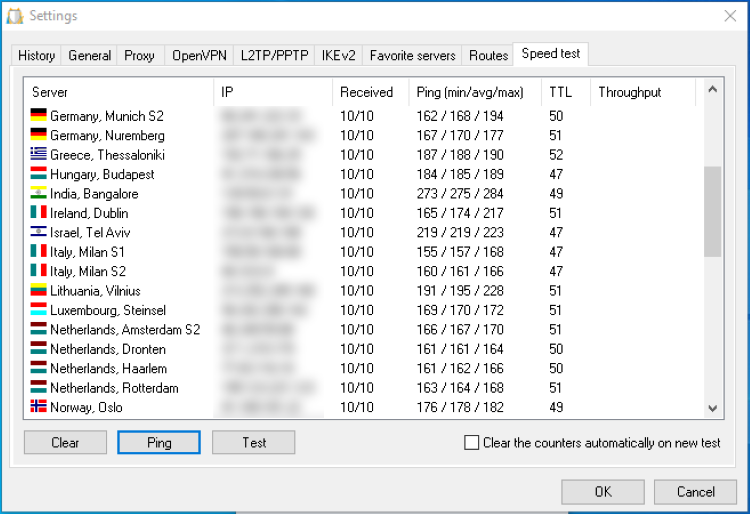
On the other tabs, you can enable proxy, bypass certain websites, add servers to favorite, and even do a ping/ speed test on various servers to find the best.
After you are satisfied with your VPN settings, you can then connect to a server of your choice.

How many simultaneous connections does HideMy.name allow?
HideMy.name allows users to connect up to 5 devices simultaneously.
How fast is Identity Cloaker?
Despite its small network, HideMy.name manages to offer some good speeds. To understand how fast the VPN is, we carried out several speed tests using both nearby and distant servers (different continents).
We noticed a speed drop of 20% to 40% for nearby servers. Distant servers averaged 35% to 60%. Overall, these are good-enough speeds, although you can get faster connections with ExpressVPN.
HideMy.name Customer Support
HideMy.name’s customer support is impressive. The VPN offers live chat support, so you can start chatting with a representative within a few seconds. The only problem is that the agents aren’t available 24/7.o
However, they also have a technical team that can respond to tickets within 2 hours. There's also a knowledge base and FAQ section that we found satisfactory.
FAQ
Can I download HideMy name VPN crack?
Some websites advertise a crack for HideMy.name. However, these cracks don't work, and some of those sites may even lure you into downloading malware.
What is inCloak VPN?
inCloak was a product of the same company, but it was upgraded to become HideMy.name.
How do you get a HideMy.name VPN Code?
The HideMy.name VPN key is usually sent to the email address you provided.
Is there an HideMy.name VPN mod apk?
There are no HideMy.name mod apks, and those that you’ll find most likely won’t work.
Can I get HideMy name promo code?
The VPN often provides some promo codes, and so you can always search on Google for the latest.





Your email address will not be published. Required fields are marked