How to fix Fortnite lag with VPN in 2026

Playing a laggy game can be frustrating, especially with online competitive games like Fortnite, where a few seconds can make or break the match. The result in an awful gaming experience and ultimately losing in the high-octane multiplayer contest.
Various reasons can cause lagging, including connectivity issues or ISP throttling. Fortnite needs a good internet connection and a low ping rate, so a good VPN (Virtual Private Network) connection might help solve this problem. So, how to fix Fortnite lag with VPN?
A VPN tunnel will streamline your connection by using its server to provide direct access to internet resources, such as a Fortnite server. It provides a smooth connection with optimized routing, resulting in faster overall connections. Continue reading to learn how to fix Fortnite lag with a VPN connection.
How to get better ping in Fortnite with VPN?
To get a better ping in Fortnite, you must choose a quality VPN service that grants a smooth connection with Fortnite servers. We recommend NordVPN as it has more than 5500 servers across the globe and also has the fastest upload and download speeds among all VPN services.
Follow the below steps to get NordVPN and enjoy better ping:
- Go to the NordVPN website.
- Click on Get NordVPN.
- Purchase the plan that best fits you.
- Download the NordVPN app.
- Open the app and connect to the nearest VPN server to your regional Fortnite server.
- Start playing Fortnite with better ping!
How does Fortnite lagging and improves ping?
As you know, a slower internet connection results in high ping, stuttering, and lag while playing online games. This is because internet data packets take too long to transport, leading to delays and other frustrating issues.
So, if your internet connection is slow but you still want to play online multiplayer games like Fortnite, a VPN could help you in many ways.
Most importantly, a VPN service allows you to optimize your connection by avoiding ISP throttling and having a direct connection to Fortnite servers. As such, this method cuts any indirect route and streamlines your traffic.
For Fortnite, the desired ping rate is 60 or lower. If you can achieve around 60 and lower ping, you will have a fantastic gaming experience and no lag.
Don’t forget to adjust your game options, such as FPS, quality presets, and rendering mode to ensure the game is optimized specifically for your hardware . It’s also worth mentioning that a VPN connection shields your online identity and keeps you protected on public networks.
Why does Fortnite lag?
As stated earlier, there are many reasons for games to lag and Fortnite is no exception. However, the most common ones are related to your ISP (Internet Service Provider), overall connection quality, and the gaming device.
Fortnite servers are also categorized by region to help users find opponents and reduce ping. After all, the closer you are to the gaming server, the better your experience will be. However, you can still enjoy improved performance and reduced lag if you are far from the regional Fortnite server.
Some solutions include proper game settings to improve the experience, using high-end hardware for faster processing, and, most importantly, using a good VPN service provider such as NordVPN to reduce lag and improve ping.
But first, you first have to understand the key reasons why Fortnite lags.
Below are some of the common reasons we have identified for Fortnite lagging.
ISP throttling
Throttling is when the ISP limits your internet connection's bandwidth. This is often done automatically to improve connections for all users under the ISP. Most ISPs throttle your internet connection for high bandwidth activities such as online gaming, video streaming, and P2P file sharing.
Although ISP throttling is an irritating thing to deal with, there are many ways you can get around it.
You can do a quick internet speed test to determine whether your connection is being throttled. If it is, you can use a VPN service such as NordVPN to mask your activities and prevent discriminatory throttling of your connection.
Slow internet
Slow internet is an issue commonly faced by gamers; sometimes, there isn’t a way around it. It happens when there is high traffic on the network, and the ISPs try to manage the connection. It also occurs when an internet connection takes a longer route to its destination.
A VPN service can deal with a slow internet connection by using its VPN servers and rerouting your network connection so that it will take an optimal route to the destination.
So, if you are experiencing a slow internet connection, use NordVPN, which has the fastest servers in the industry, to get around it.
System issues
Besides the ISPs and connection route, the hardware you use significantly impacts your gaming experience. If your system has low storage, low RAM, a weak graphics card, outdated system software, etc., you will experience lag even if the internet connection is top notch.
The solution here is to either optimize your gaming settings so that your hardware can handle the game or upgrade your hardware to match the high-end requirement of the game.
Avoid Fortnite lagging on different devices
You can enable a VPN connection to avoid Fortnite lagging on different devices. Below, we have provided step-by-step guides for enabling VPN on PC and gaming consoles.
We have used NordVPN as an example for the setup, as it is one of the most reliable VPN services and has the fastest VPN servers among all providers.
Enable VPN for Fortnite on PC (Windows, Mac)
- Download and install the NordVPN app on your PC.
- Open the app and log in to your account. If you have not registered, click create an account and purchase your subscription.
-
Pick a suitable country location and connect to a server there.

- Use an IP checking website to ensure your location changed.
- Play Fortnite securely and without network lagging issues!

Enable VPN for Fortnite on Xbox, and PS4 (gaming console)
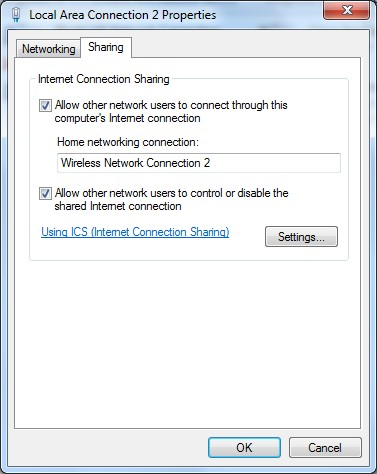
Unfortunately, gaming consoles don’t support VPN software natively. As such, you must share the VPN connection from another device, such as your computer. Alternatively, you can configure your home router with a VPN connection and then connect the console to the reconfigured network.
Follow the below steps to enable Fortnite on gaming consoles through a PC.
- Follow the steps in the above section to enable NordVPN on your PC.
-
Connect your gaming console to the PC using an ethernet cable.

- Ensure you have “Allow other network users to connect through this computer’s internet connection” enabled from the “Network and sharing center” menu.
- Game securely on your Xbox or PlayStation!
Why does Fortnite lag while using VPN?
Although a VPN tunnel can improve the connection with the game server and reduce lag, there can be instances where that’s not the case. Instead, the VPN will reduce your speed because your connection has an extra step between you and the Fortnite servers.
Below are some of the reasons we have identified why Fortnite lags while using a VPN:
Use of low-quality VPN services
Low-quality VPN services that don’t have the best technical features will lead to lag while playing Fortnite. Also, using free VPN services also leads to subpar performance because they’re held back by various limitations, such as data caps and a low number of servers.
To get around this issue, you must choose high-quality VPN services, such as NordVPN, that are well-known across the gaming community. With NordVPN, you will have access to the best tech on the market for keeping your connections fast and secure. You can also consult customer support to improve your connection and reduce lags.
Not connecting to the nearest VPN server
As mentioned earlier, Fortnite has regional servers for delivering optimal connections in specific continents. Naturally, connecting to the nearest VPN server is also essential for top connectivity. Plus, you can’t dismiss the possibility of a VPN server simply being overcrowded.
You’re less likely to come across such problems if your VPN provider has a massive server fleet, ideally with thousands of servers worldwide. NordVPN, our top VPN for gaming, has over 7,100 servers in 137+ countries. Try it out to see how well it works with your favorite games.
VPN app issue
There’s a small chance that the VPN software is behind your connectivity issues. A simple restart or update should swiftly remedy this problem. If not, consider reinstalling it.
Bypass Fortnite VPN error

Games like Fortnite have to abide by the rules of each country they provide services in. Although some countries explicitly ban Fortnite, others require a legal obligation to secure users' data. This is a crucial reason why Fortnite discourages using proxy services like VPNs and displays an error message whenever it detects someone using VPN.
However, there are ways you can work around it. Firstly, a quality VPN service like NordVPN will effectively hide your connection and change your IP address, thus bypassing detection by Fortnite.
Furthermore, you can reduce the chances of being discovered by consistently connecting to the same VPN server location, ideally in the same country you reside in.
Other options that may fix Fortnite lag
Besides using a VPN, you can also reduce the lag on Fortnite by implementing the following solutions:
- Improve your Graphics cards and other hardware elements.
- Change Fortnite graphics settings to lower quality presets.
- Change rendering mode to Performance.
- Update your graphics drivers and network adapters.
- Change your system's performance options.
- Connect to the nearest Fortnite gaming server.
Wrapping up
Although having performance-optimized hardware for gaming is important, the network plays a crucial role too. So, the best way to improve your network connection with the gaming server is to use a VPN service like NordVPN for optimal routes and non-congested traffic. Start your NordVPN subscription today and reduce lag in Fortnite.
FAQ
How do I stop Fortnite from lagging?
You can stop Fortnite from lagging by improving your internet connection using NordVPN, adjusting your game settings, and upgrading your system hardware.
How do I make Fortnite load faster?
To make Fortnite load faster, you must connect to the gaming server on the shortest route possible. You can achieve it by using a fast VPN service like NordVPN.
Why is my PS5 lagging with good internet?
If your PS5 is lagging with good internet, it must be because of a hardware issue, outdated software, low storage, or not connecting to the nearest gaming server.
How do I make Fortnite run better on PS4?
You can make Fortnite run better on PS4 by reducing the graphic settings and improving your connection using a top-quality VPN service like NordVPN.
How do I fix lag in Fortnite on a low-end PC?
To fix lag in Fortnite on a low-end PC, you should set quality presets to low and improve the connection by using a VPN service with the fastest servers. We recommend NordVPN as it uses efficient and modern technologies for maintaining top performance.