1Password coupon codes for 2026

This guide offers the most up-to-date and verified 1Password discount codes for 2026. These active and easy-to-use deals allow you to secure your online accounts for less with one of the most trusted password managers.
You'll also find step-by-step instructions on how to apply these discounts, along with tips to help you choose the best 1Password plan for your personal or family requirements.

Special deal: Get 1Password Individual plan with 50% off
Save 50% Off Yearly Subscription
Limited-time offer: Save 50% on the 1Password Families plan
Save 50% Off Annual Subscription
1Password Free Trial
Try 1Password free for 14 days
How much you can save with 1Password discount deals
The table below highlights the most recent 1Password prices for each plan, showing both the regular rates and the current discounts. All coupon codes are applied automatically at checkout, and the reduced price is displayed immediately.
| 1Password plans | Monthly | Annual price | Discounted annual price | Discounted annual price |
| Individual plan | $3.99/month | $2.99/month | $1.50/month | $18.00/year |
| Families plan | $6.95/month | $4.99/month | $2.50/month | $30.00/year |
With the latest 1Password deals, you can save on both the Individual and Families plans – a simple way to stay protected online while keeping your budget in check.
The Individual plan is ideal if you just need a straightforward yet secure password manager. It lets you generate strong passwords, save and autofill logins automatically, and securely share information with trusted individuals. You can also use it across all your devices and get alerts if any of your passwords are weak or exposed.
If you’re looking to cover more than one person, the Families plan includes everything from the Individual plan plus more. You can add up to five family members, create and share unlimited vaults, and control access easily with clear admin settings. It’s a great pick for keeping everyone’s online accounts secure and organized.
1Password 14-day free trial offer
1Password stands out as one of the few password managers offering a free trial for business accounts, providing companies with a 14-day window to fully explore its features before committing. The business plan empowers organizations to monitor password health and gain insights into potential breaches, proactively addressing security risks.
The platform seamlessly integrates with existing security infrastructure, while also providing employees with secure, universal sign-on for all applications. Businesses can centralize the management and protection of identities, applications, and devices, simplifying access permissions for every team member. Furthermore, 1Password extends single sign-on capabilities to all applications, improving account management security and efficiency across the entire company.
How to apply a 1Password discount code
Using a 1Password coupon is quick and straightforward. Here’s how to claim your discount:
- Select your deal by clicking on the discount you want from the list above
-
Get redirected to the official 1Password website, where the coupon code is automatically applied

- Create your account by signing up with your email address
-
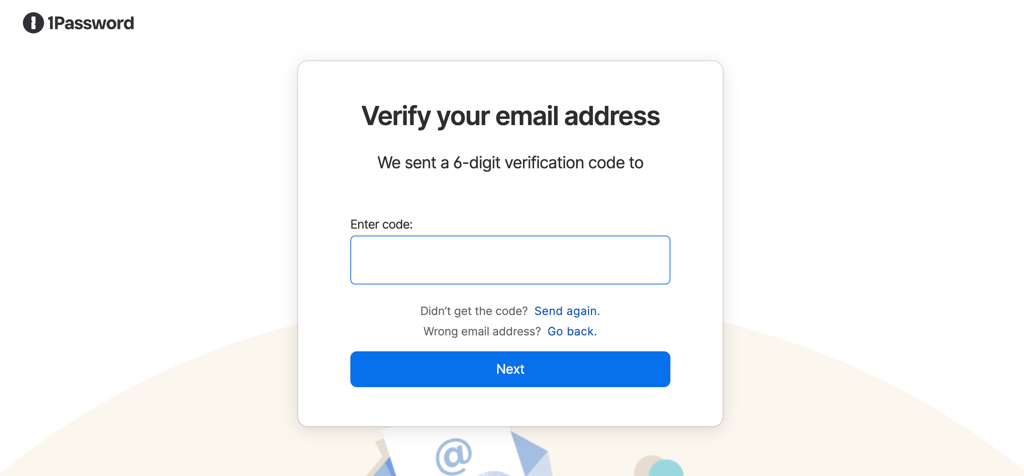
Verify your email with a verification code and confirm your account
-
Set up your master password that’s strong and unique to secure your vault

-
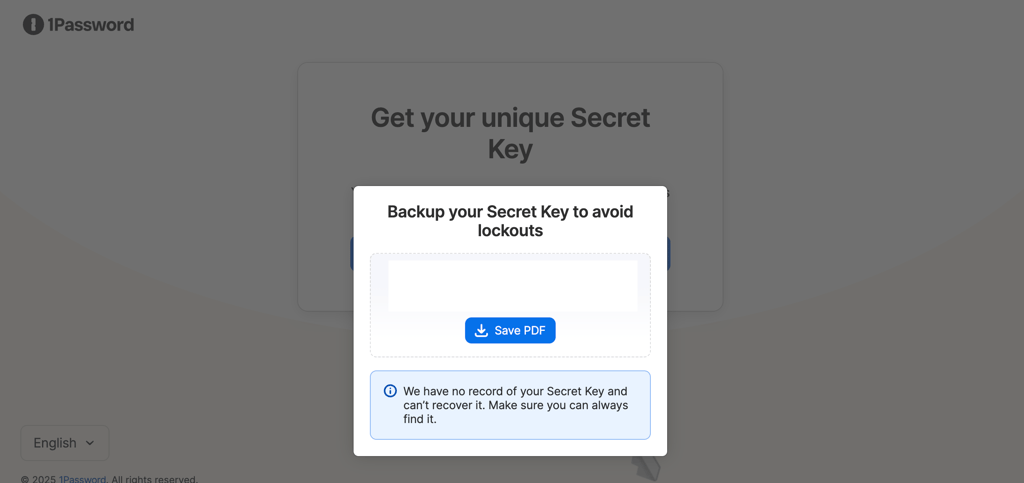
Download your Emergency Kit to help you recover your account if you ever forget your master password

-
Add billing details and select your preferred plan



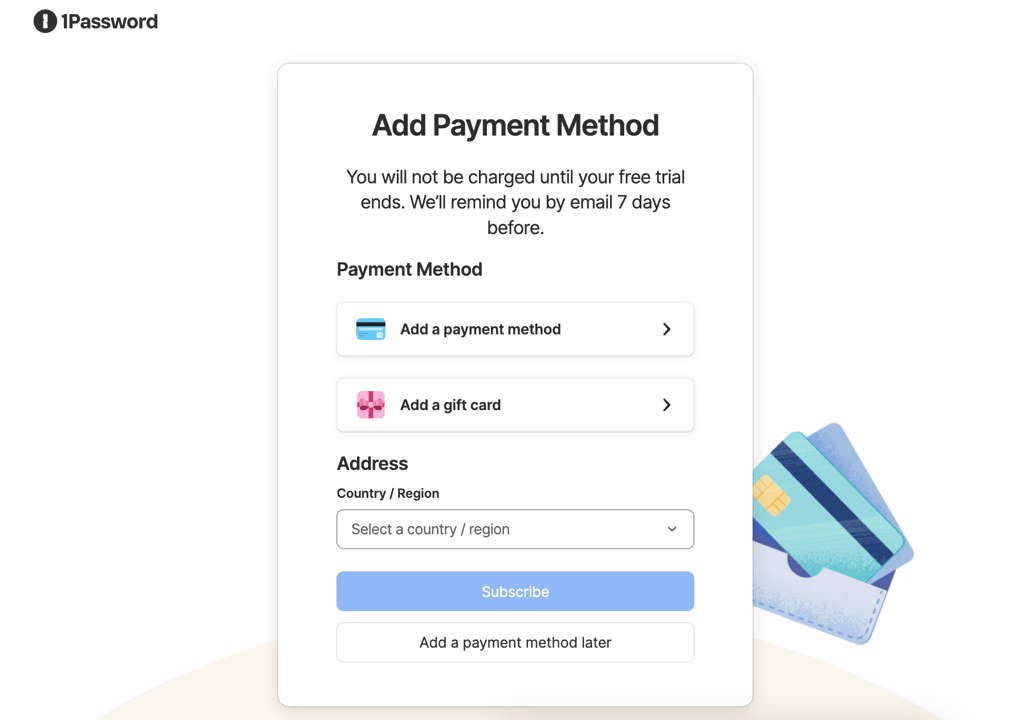
You’ll be billed monthly – first at the discounted price, and later at the regular subscription rate once the offer period ends.
Disclaimer: The prices listed above are approximate examples. Please confirm the exact pricing and terms directly on the 1Password website before completing your purchase.
Troubleshooting a 1Password coupon that won’t work
If your 1Password promo code isn’t applying at checkout, don’t stress – it’s usually easy to fix. Here are the most common reasons it might not be working:
- Typing mistake. Double-check that the code is entered exactly as shown — even one misplaced character can invalidate it.
- Technical glitch. If the code is still valid and entered correctly, the issue might be on 1Password’s side. In that case, reach out to their customer support for help.
- Expired coupon. Every code has an expiration date, so make sure yours is still valid. You can always find the latest active deals on our coupon page.
If you can’t reach 1Password directly, contact 1Password’s support team. Be sure to include all the relevant details, especially which coupon code you tried, so they can help you sort it out quickly.
How we find and test 1Password discount codes
We aim to help readers save on trustworthy security tools like 1Password. We collaborate directly with 1Password to verify discounts and personally test each promo code before publishing it.
Our team constantly tracks new deals, user feedback, and reliable sources to ensure every offer is current. Expired codes are removed right away, so you’ll always find the most accurate and up-to-date 1Password discounts.
Why we recommend 1Password
1Password continues to stand out as one of the best password managers in 2026 and for good reason. Its clean design and intuitive tools make creating and managing strong passwords effortless. With seamless syncing, you can securely access your data from your phone, tablet, or computer without any hassle.
Beyond basic password storage, 1Password offers advanced features like Watchtower, Travel Mode, and Privacy Cards, all designed to help you stay one step ahead of online threats. Whether you’re safeguarding logins, payment details, or sensitive files, 1Password gives you strong, easy-to-manage protection you can rely on.
Here’s a quick look at some of 1Password’s key features:
- Password generator. Instantly create complex, random passwords (up to 100 characters) with letters, numbers, and symbols — or opt for more memorable passphrases.
- Unlimited logins. Store unlimited passwords and use 1Password across all your devices. The Families plan lets you share the protection with up to five people.
- Encryption. Uses AES-256 encryption to keep your data secure and unreadable to outsiders. Every account also includes a unique 34-character Secret Key that ensures only you can access your vault.
- Autofill. Log into websites and apps quickly with accurate, one-click autofill.
- Secure sharing. Safely share passwords, notes, and documents with trusted users, keeping your information private.
1Password real-life use cases
1Password is a complete security tool for personal, family, and professional use. It’s great for families who share logins, teams managing sensitive data, and travelers who need security on the go. From developers securing code to small businesses managing staff access, 1Password delivers flexibility and reliable protection.
1Password use cases for families
Managing shared accounts for streaming services, online shopping, or banking can easily get messy. The 1Password Families Plan keeps everything organized by giving each person a private vault and a shared one for common logins. Parents can safely share credentials with kids without revealing sensitive details.
It also includes an emergency recovery feature, letting trusted family members regain access if someone forgets their password or during an emergency. With its mix of convenience, security, and control, it’s easily one of the best password managers for families.
1Password use cases for travelers
Frequent travelers often rely on public Wi-Fi in airports, cafés, or hotels, which can expose personal data. 1Password keeps all your logins, payment info, and travel documents encrypted, even on unsecured networks.
Its Travel Mode lets you safely access critical data offline and temporarily remove sensitive vaults from your devices while crossing borders. You can also store passports, visas, and loyalty details in one secure vault, reducing the risk of loss or theft.
1Password use cases for developers and tech teams
Developers handle sensitive data like API keys, SSH credentials, encryption keys, daily. 1Password protects these assets with AES-256 encryption and organizes them for quick access when needed.
It integrates seamlessly with tools like GitHub, Jenkins, and other CI/CD platforms, and includes a command-line interface (CLI) for developers who prefer working in code. It’s a secure, developer-friendly solution that reduces the risk of credential leaks.
1Password use cases for businesses
For companies, password sharing and management across teams is essential. 1Password’s Shared Vaults make it simple to securely store and share credentials for tools like CRMs, project management apps, and cloud dashboards. Admins can control permissions, assign roles, and track access activity for full oversight.
It’s especially valuable for startups and small businesses that prioritize collaboration, speed, and data safety, helping teams work efficiently while minimizing the risk of security breaches.
FAQ
Can I use 1Password for free?
You can try 1Password free for 14 days to see if it fits your needs. After the trial, you can choose a plan that works best for you. If you only need to generate strong, unique passwords, you can also use free online password and username generators.
Does 1Password offer discounts?
Yes, 1Password frequently runs discounts and promotions, especially for new users. You can often find deals of up to 50% off for the first year on Individual and Family plans.
Is there a student discount for 1Password?
Yes, 1Password offers a 50% student discount. To qualify, sign up through the Student App Center using your academic email, create an account, and then redeem the discount on the 1Password website.
What is 1Password’s return policy?
During the 14-day free trial, you can cancel anytime without being charged. If you’re on a paid plan, canceling stops future payments, but your account stays active until the end of the current billing period. 1Password does not refund past charges.
Are there discounts for existing 1Password users?
1Password doesn’t provide direct discounts to existing users. However, they occasionally share special offers via their newsletter, so it’s worth keeping an eye on your inbox for updates.