
Best VPN for Twitch streaming in 2026

Twitch is a popular live streaming platform that showcases various content. You can watch esports competitions, video game live streams, and even music broadcasts.
However, users in certain countries like China, Turkey, and parts of Russia cannot use Twitch due to geo-blocking restrictions. More so, some people may face ISP throttling, account bans, restricted content, DDoS attacks, and even hacking.
Our article will help you select the best VPN for Twitch streaming. These tools encrypt your internet and change your location, providing much-needed security and freedom online. Thus, you’ll overcome each of these obstacles and get access to the platform from anywhere.
Our top 5 best VPNs for streaming Twitch
- NordVPN – overall best VPN for Twitch streaming
- Surfshark – most affordable Twitch VPN
- Atlas VPN – best freemium Twitch VPN
- ExpressVPN – lightning-fast VPN for Twitch streaming
- CyberGhost – VPN for Twitch with the most servers
Why would you need a VPN for Twitch?
There are a myriad of reasons why its beneficial to use a reputable VPN for all your Twitch activities. Namely, these are:
- Geo-blocks. VPNs let you change your virtual location. If you choose a server in a country where the platform is allowed, you will get access to Twitch content.
- Restricted content. Even if you live in a region that allows Twitch, you may still encounter restricted content due to licensing agreements. It leads to inequality across countries, as content creators determine what you can stream and in which regions. Choosing a VPN server in another country is a simple solution.
- ISP throttling. Streaming platforms like Twitch are often exposed to ISP throttling, known to slow down certain types of internet traffic, such as video streaming. With a VPN, you can keep your online activities hidden from your ISP and potential eavesdroppers.
- Twitch bans. You can get a banned if your IP address is linked to any violations of Twitch’s ToS. Twitch can also block you if you have the same IP as other users. VPNs let you change your IP address, making you appear as another user.
- Security. Twitch is susceptible to DDoS attacks and hacking attempts. However, using a VPN can provide a layer of protection to your connection, making it more challenging for cybercriminals to intercept your data. Or launch attacks against your device.
5 best VPNs for Twitch – overview
We tested multiple providers and picked those which consistently unblock Twitch. In addition, we tried their server fleets and key features like split tunneling and obfuscation. Other aspects like pricing, security, and speed were also considered. In the list below, you can see which is the best VPN for Twitch streaming.
1. NordVPN – lightning-fast Twitch VPN speeds
NordVPN comes with fast connection speeds and robust security features. It bypasses geo-restrictions with ease, significantly improving the overall Twitch experience.
Streaming: NordVPN utilizes powerful security measures that let you watch Twitch in restricted countries. Plus, the service has over 9,200 servers across 137 countries, granting access to all kinds of foreign content.
Performance: NordVPN’s speeds are impressively fast, thanks to the NordLynx protocol. In our tests, this provider achieved an average rate of 249mbps, with very minimal connection speed drops. It means users can enjoy lag-free streaming on Twitch.
Security: The service offers the essential VPN features such as AES-256 encryption, a kill switch, and leak protection. Furthermore, all servers are RAM-only, and its no-logs policy has been independently audited. All in all, NordVPN ensures user privacy and safety while streaming on Twitch.
Features: More so, you get useful perks like Double VPN, Tor over VPN, and Threat Protection to enhance your experience. You can also use split tunneling to route the encrypted connection through selected apps only.
Compatibility: NordVPN works on various operating systems, such as Android, iOS, Windows, MacOS, Linux, and Fire TV. It also allows users to connect up to six devices simultaneously, and you can install it on a router.
NordVPN prices start at $3.49/month, and users can try the service risk-free with a 30-day money-back guarantee. There’s also a 7-day free trial on Android devices.
To learn more, check out our in-depth NordVPN review.
2. Surfshark – a 7-day free trial VPN for Twitch
Surfshark is an affordable VPN option for Twitch users seeking a cost-effective solution. It doesn’t sacrifice essential features, and, in fact, you’re getting tons of extra perks. With the Surfshark promo code "OFFCN", you can get up to 88% off, making it one of the best-value VPNs available right now.
Streaming: Surfshark boasts an extensive fleet of over 4,500 servers across more than 100 countries. This offers users a wide range of server options for streaming Twitch. And ensures you have plenty of servers near you for great connectivity.
Performance: This Twitch VPN utilizes the industry-standard WireGuard tunneling protocol. With fast and stable connection speeds of 263mbps regardless of online activity, streaming will be smooth as butter.
Security: Surfshark incorporates AES-256 encryption, leak protection, a kill switch, and a NoBorders feature to prevent online censorship. Additionally, Surfshark’s audited no-logs policy and RAM-only server infrastructure guarantee that it doesn’t collect or store user data.
Features: Additionally, users can opt for the Surfshark One bundle, which includes an antivirus and IP rotator. Besides that, the free features that come with every subscription include split tunneling, MultiHop, and CleanWeb.
Compatibility: Surfshark has apps for iOS, Windows, Android, MacOS, and Linux. Also, there are no restrictions on the number of devices that can be connected simultaneously.
Surfshark is an excellent choice for Twitch users, costing only $2.49/month. There’s a 30-day money-back guarantee and a 7-day free trial on Android and iOS in case you want to test the waters first.
For more information, read our detailed Surfshark review.
3. Atlas VPN – best free security features for Twitch
Atlas VPN delivers fast and dependable server connections, providing Twitch users high-quality protection. And the service is incredibly cheap, meaning you won’t have to shell out to get the content you want.
Streaming: This freemium VPN can bypass all geo-restrictions for accessing Twitch, with its 1,000 servers in over 42 countries. While the fleet isn’t as big compared to other providers, it get’s the job done.
Performance: Atlas VPN uses the WireGuard protocol, which offers fast speed for Twitch viewers and casters. More so, the free version of the VPN does not limit connection speeds.
Security: Its security features include AES-256 encryption and P2P support that are reliable in both the free and paid versions. Atlas VPN also adheres to a no-logs policy, ensuring it doesn’t collect your data, including your real IP address.
Features: Atlas VPN allows P2P traffic on all servers, and the VPN can start automatically, making access faster and more convenient. There are also dedicated streaming services that ensure the best viewing experience possible.
Compatibility: The provider is compatible with multiple platforms, including Windows, macOS, Android, iOS, Android TV, and Amazon Fire TV/FireStick. This allows users to access Twitch on almost any device they want.
You can get Atlas VPN for only $1.64/month. Every subscription comes with unlimited simultaneous devices. Take advantage of the 30-day money-back guarantee to use the premium version for free for a whole month.
Learn more in our detailed Atlas VPN review.
4. ExpressVPN – reliable unblocking capabilities
ExpressVPN is a superb VPN for Twitch if you’re looking for a fast and reliable option. It unblocks geo-restricted Twitch content while also providing a secure and smooth experience.
Streaming: With over 3,000 servers in 105 countries, ExpressVPN allows users to easily access Twitch in restricted countries. Furthermore, the vast country selection proves to be useful for other streaming platforms, not just Twitch.
Performance: The Lightway protocol is a fast and efficient, making ExpressVPN one of the fastest VPN services available. Its average speed is around 231mbps, guaranteeing zero lag and minimal buffering.
Security: To protect your online Twitch activities, ExpressVPN uses 256-bit AES encryption, a kill switch feature, and DNS leak protection. It also has a strict no-logs policy, which was independently audited and even tested in court.
Features: ExpressVPN offers several functions that enhance your Twitch experience. One is split tunneling, which allows you to choose which applications or websites use the VPN. Another is Threat Manager, which stops apps from tracking your online movements.
Compatibility: Users can enjoy using Twitch from Android and iOS devices, as well as Windows, MacOS, and Linux operating systems. You can connect up to five devices to the VPN service simultaneously.
Although the starting price of $2.49/month is not the most competitive, it is still an option for users looking for a Twitch premium VPN service. Still, there’s a 30-day money-back guarantee that protects the purchase. And a 7-day free trial on Android and iOS if you don’t want to commit right away.
Find out more in our in-depth ExpressVPN review.
5. CyberGhost – beginner-friendly Twitch VPN
With its wide range of servers, CyberGhosts enables you to unblock Twitch from almost everywhere. At the same time, it secures your online experience with robust security measures.
Streaming: CyberGhost has over 11,500 servers in 100 countries. Thus, users can easily bypass geo-restrictions and access Twitch content that may be blocked in their region.
Performance: Regarding connection speeds, CyberGhost VPN utilizes the market-leading WireGuard protocol. It maintains an average rate of 254mbps, allowing users to stream and watch Twitch content without any buffering.
Security: Your data is secure and protected with CyberGhost VPN, which uses AES-256 encryption and does not collect activity logs. Furthermore, the service includes a powerful kill switch in case the VPN connection drops unexpectedly.
Features: CyberGhost VPN provides a one-click VPN connection and browser extensions. You can use a customizable split tunneling feature to tailor the VPN to your liking, too. Finally, there are specialized servers for gaming, torrenting, and streaming.
Compatibility: This VPN for Twitch will allow you to enjoy content on a plethora of devices. You can download a dedicated app for iOS, Android, macOS, Windows, Amazon Fire TV Stick, and Android TV. The provider also supports Linux, Android TV, and Apple TV devices.
CyberGhost VPN is an affordable option for users on a budget, starting as low as $1.59/month. It also offers a 45-day money-back guarantee for those who want to try out the service risk-free.
Learn more in our in-depth CyberGhost review.
Our methodology for picking the best Twitch VPNs
To identify the best VPNs for Twitch, we evaluated them based on the following criteria:
- Speed: We tested the speed of different VPN providers to see how they compare to your regular internet connection. We also checked their ability to provide high-definition picture quality and low latency while streaming and watching Twitch. Rest assured, only the fastest VPNs made it to the list.
- Server locations: Twitch streams are hosted in data centers worldwide. So, you’ll want to choose a VPN provider with servers in the exact geographic locations as the Twitch servers you want to connect to. We looked for providers with vast server networks, encompassing as many countries as possible.
- Device support: To ensure compatibility, we tested the VPN on different devices and operating systems. Most have dedicated applications for all major OS, including support for streaming peripherals or at least routers.
- Security: We checked for solid encryption protocols, a no-logs policy, and features like a kill switch to protect your data if the VPN connection drops.
- Customer support: We selected providers that offer 24/7 support through multiple channels, such as live chat, email, and phone. This way, you can get help quickly if you experience any issues while using the service.
How to use VPN for Twitch streaming
Using a VPN for streaming Twitch is a fast and straightforward process that will take only a few minutes.
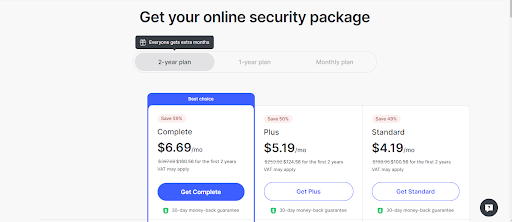
- First, you should choose a trustworthy VPN provider. Our top choice is NordVPN.
-
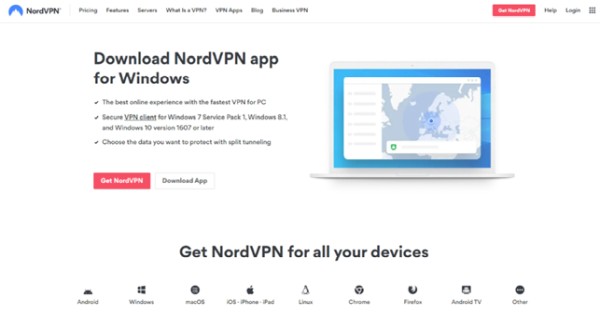
Click on ‘Get NordVPN,’ and subscribe to your chosen plan.

-
Download and install the NordVPN app.

-
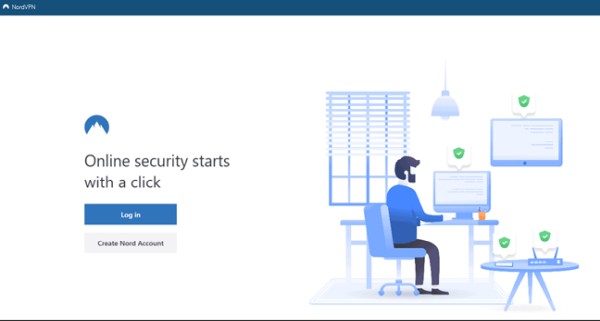
Log in.

-
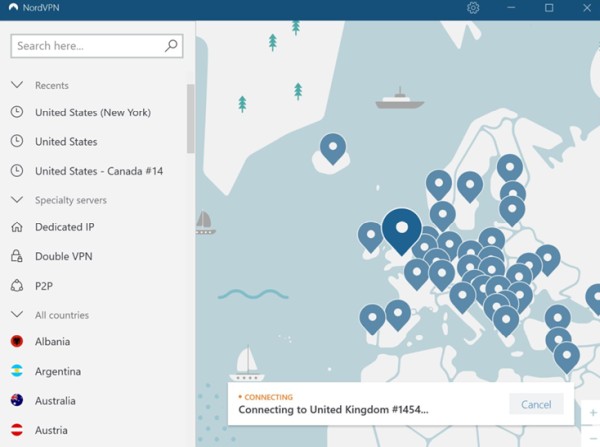
Choose a new location by simply clicking on the location tag.

-
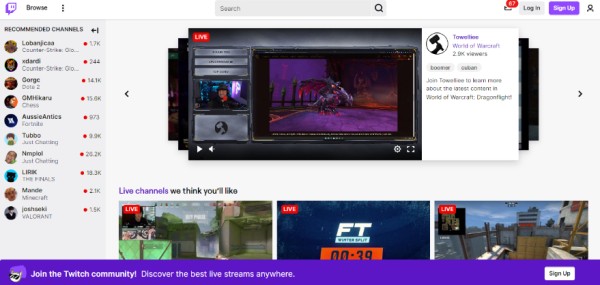
Open Twitch and click on ‘Sign Up’.

- Relax and enjoy your favorite content!
Best VPN for Twitch that Reddit users recommend
Reddit is a vast online community where people worldwide share their opinions, experiences, and recommendations. Many Redditors have recommended the best VPNs for Twitch streaming that users may find helpful if they are looking to enhance their streaming experience.
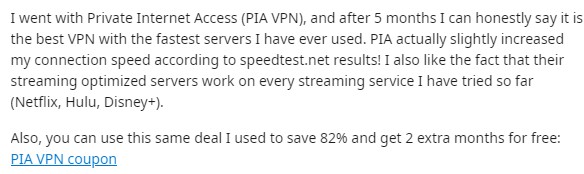
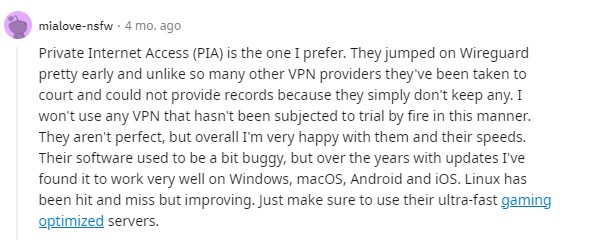
PIA VPN is a recommended Twitch VPN with fast servers that improve users’ connection speeds. They also say that this VPN for Twitch has optimized servers that also work on other streaming services like Netflix and Hulu.
Other Twitch VPN Reddit recommendations are Mozilla VPN and Urban VPN. According to various opinions, both of these VPNs offer streaming and incredible speeds.


Still, you’ll find many Redditors recommending the same Twitch VPNs that made it to our list, too. So, what service to pick? Get one according to your specific needs.
Is using VPN for Twitch legal?
Yes, using a VPN to access Twitch is legal. However, Twitch is not available in some parts of the world, like Russia, Iran, and China, as these countries ban VPN use partially or entirely.
In those countries where using VPN is legal, users shouldn’t use the services for illegal purposes or in violation of any laws or regulations. And they must agree with the Terms of Service and must not engage in certain activities like the following:
- Creating or distributing unlawful, defamatory, harassing, or obscene content
- Impersonating others and spamming users
- Interfering with security or copyright features
- Reverse engineering
- Disrupting Twitch services or other users
Is a free VPN a good option for Twitch?
No, a free VPN is not adequate for accessing Twitch. We do not recommend them due to security issues, like selling user data to third-party companies and their quality. Additionally, Twitch often blacklists free VPN IP addresses, making it difficult to bypass restrictions.
We recommend using a freemium VPN or a paid VPN with a free trial instead. Our top choices are the NordVPN and Surfshark free trials and the Atlas free version.
1. NordVPN free trial
NordVPN provides a free trial and a 30-day money-back guarantee that allows customers to receive a full refund for any plan they purchase, regardless of the reason. You can test out the world’s fastest VPN without any limit to its features.
Getting a refund is very straightforward – you just need to contact their customer support. However, if you downloaded NordVPN from your phone, you must contact App Store customer support to get your refund.
2. Surfshark free trial
Surfshark is our second top choice for the best VPN for Twitch streaming. It has a 7-day free trial for iOS and Android platforms. Also, its features and performances are the same as in the paid plans.
If you download it from another device, you can enjoy the Surfshark VPN and get a full refund, no matter the reason. To request a refund, you just need to contact their customer support team via live chat or email.
3. Atlas VPN freemium VPN
The Atlas freemium VPN has an entirely free plan that includes all the necessary features and a 5GB/month data cap. You can only pick from 3 server locations, and it’s not suitable for accessing geo-blocked streaming services.
Its paid plans offer a 30-day money-back guarantee that grants you a full refund if you contact its customer support via email or live chat. You don’t need to have a particular reason for getting a refund.
Conclusion
Twitch, like many other content platforms, offers a wide range of entertainment. Still, it’s not available unanimously across the globe, with some content being restricted in certain countries to boot. Luckily, the best way to bypass any Twitch troubles is with a VPN.
Top-rated providers like NordVPN offer vast server fleets, so getting access to any content you want is easy. And with superb speeds, you can expect a smooth streaming experience any time of the day. Enhanced security and privacy are other neat perks.
FAQ
Can I stream on Twitch with a VPN?
Yes, you can stream on Twitch with a VPN. The only exception is if you somehow violated their Terms of Services or you are in a country where using a VPN is not allowed. Then, you might face penalties.
Which VPN is best for live streaming?
There are a few VPNs that are good for live streaming, but our top choice as the best VPN for Twitch streaming is NordVPN. It provides exceptional speeds, top-notch security features, and over 9,200 servers in 137 countries that bypass all geo-restrictions and unblock streaming content.
What VPN extension for Twitch should I choose?
It is essential to choose a reputable and reliable VPN that does not log your internet activity, such as our recommended Twitch VPNs. Each of these VPNs offers excellent security features, lightning-fast speeds, and affordable prices for their services. And they come with browser add-ons as well.






Your email address will not be published. Required fields are marked