
NordVPN vs PureVPN: 2026 June comparison

Having trouble deciding between NordVPN vs PureVPN? Selecting a VPN is a pretty intimidating task. They offer different sets of features, may not support some devices, and come in a pretty wide price range.
While both VPNs are popular, NordVPN is a big guy on campus. It won’t disappoint you no matter for what purpose you choose it.
In this article, we will compare NordVPN vs PureVPN so you can make a clear decision if you are split for choice.
Let’s dive deep right in and find out which service is the winner of the PureVPN vs NordVPN battle.
NordVPN vs PureVPN – key features compared
It is essential to highlight the major differences while comparing NordVPN vs PureVPN. This table includes all categories worth considering while choosing a VPN.

Interface overview
NordVPN's desktop application occupies a lot of space because it provides two options for selecting server locations: by typing the name of the desired location or by using a map. Using the desktop or smartphone apps of NordVPN is pretty easy, and you will not experience any issues.
NordVPN shows a huge yet clear map to set desired locations on its Windows and Mac versions. It’s easy to navigate around since it has a list of countries on the left-hand side, and on the right side, you can find a map. You can access the setting menu on a tab at the top.
PureVPN is also easy to install, with clutter-free, lightweight apps and a clear interface for many devices. However, its desktop app is not that user-friendly and needs some improvement. In the sidebar, there is a nice, clean server list, and there is a quick-connect button on the main page.
The beta version of PureVPN has a bit lacking design. It is only the connect button that adds color to the whiteness of the window. Moreover, its Mac and Windows versions lack certain features that should be present in them.
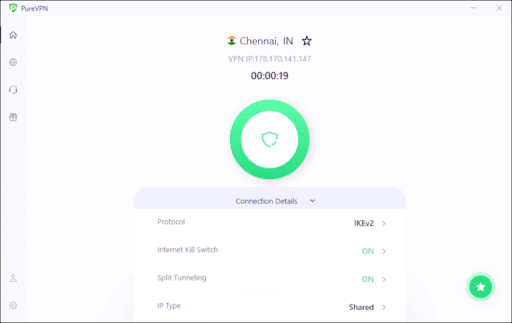
NordVPN vs PureVPN speed
It's important to note that NordVPN is faster than PureVPN when comparing connection speeds. A VPN must perform well as people spend more time online streaming videos, browsing, and connecting with others.
NordVPN has an in-house NordLynx protocol that only slightly reduces browsing speed.
Windows and Android apps of PureVPN have WireGuard, which is known for performance. However, Mac and iPhone users can’t avail themselves of this protocol.
We made the test with a baseline speed of 120 Mbps for download and 115 Mbps for upload.
Speed test USA server
Using NordVPN's US server, NordVPN offered good upload and download speeds of 93.5 and 89.52 Mbps, respectively.

Using PureVPN's server in the United States, it delivered 51.67 Mbps download speeds and 65.42 Mbps upload speeds with a very high ping of 299 ms at this testing time.
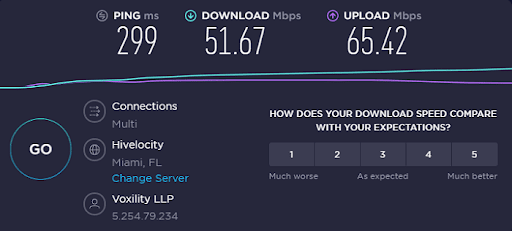
Speed Test UK server
The download speed for NordVPN's UK server was 92.84 Mbps, and the upload speed was 97.67 Mbps, with comparatively high pings of 265 ms.
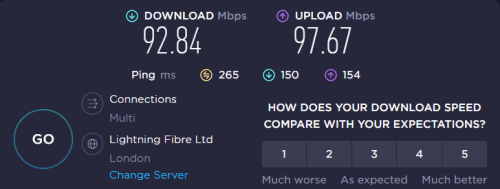
Additionally, PureVPN performed slightly better on the London-UK server than the US one, delivering download speeds of 74.59 Mbps and upload speeds of 80.09 Mbps. It took 128 milliseconds for the data to come back to us from the server.
Speed Test Australia server
NordVPN managed 91 Mbps download and upload speeds on the Australian server with pings of just 131 ms, so it performed quite well on that server as well.

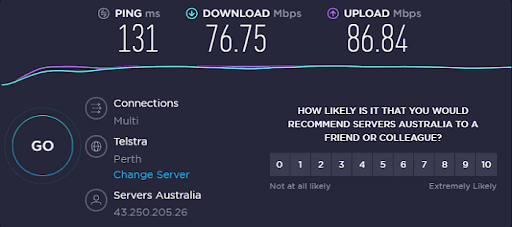
On its Australian server, PureVPN managed upload speeds of 86.84 Mbps and provided download speeds of 76.75 Mbps, which is better than the speed on other servers.
Features review and comparison
A VPN with handy features that improve its functionality has high selling points. Both NordVPN and PureVPN have many basic and advanced features.
Speciality servers
Being equipped with Threat Protection, Onion over VPN, and Double VPN, NordVPN is loaded with tons of features. With Threat Protection, you can prevent malware from infecting your device, and it also helps to block ads. Since it blocks ads, malware, phishing sites, trackers, and more, it increases your loading speed.
NordVPN offers dedicated servers for different purposes that are listed below:
- Double VPN servers that ensure maximum security after passing your online traffic through two servers
- You can bypass restrictions with its Obfuscated servers
- With Onion over VPN, you can add an extra layer of security to the Tor network
- Torrenting and file-sharing are easy with P2P-optimized servers
If you want your IP address not to be changed, you can opt for a dedicated IP.
There are four modes available with PureVPN: Stream, Internet Freedom, Security/Privacy, and File Sharing, although it doesn’t offer specialty servers as NordVPN does.
Split tunneling
By using the VPN, you don't have to encrypt all your traffic. The split tunneling feature only protects the select programs and websites, allowing you to access local resources at the same time freely.
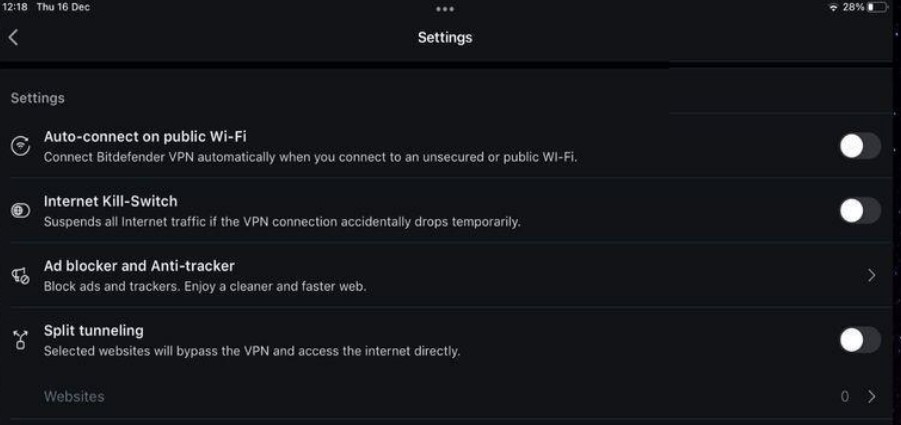
You can get this feature on NordVPN’s desktop and Android devices, while PureVPN has it on Android devices only.
Port forwarding
This feature is available with PureVPN. You need to be a bit tech-savvy to use this feature. With it, you can remotely access your computer or a security camera connected to your network. Whether you want to set up a gaming server or host a website, port forwarding helps you do so.
Smart DNS
With NordVPN’s Smart DNS, you can watch Netflix, HBO Max, Hulu, and many streaming services on any device. This feature is called SmartPlay, which secures all your content and offers the benefits of Smart DNS plus VPN encryption. In the meantime, PureVPN is yet to offer this feature.
Threat Protection
If you are looking for an antivirus feature, NordVPN offers Threat Protection. It prevents you from opening malware-infected websites and notifies you whenever you attempt to open them.
Moreover, you can also consider it an ad-blocker since it blocks annoying ads. You can enable or disable this feature according to your requirement.
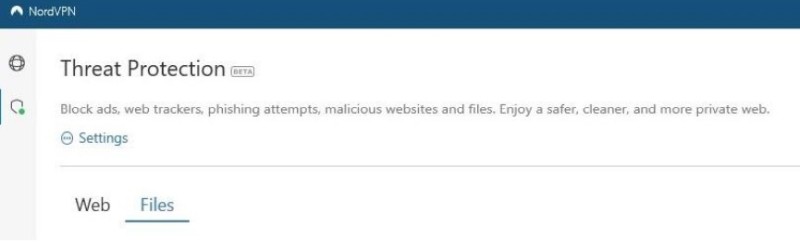
Sadly, PureVPN doesn’t offer anything similar.
Kill switch
When the network connection drops, this feature protects your privacy by shutting your internet connection. This way, it ensures that your Internet Service Provider can not see your activity.
While using the kill switch, your sensitive information and IP address remain private and can not be exposed.
NordVPNs has an advanced kill switch feature with two modes:
- Internet Kill Switch: shut your connection when the VPN connection drops.
- App Kill Switch: shut the internet connection of select apps when VPN stops working.
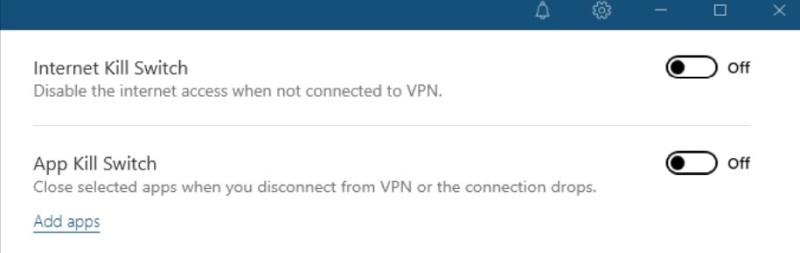
PureVPN also has a kill switch feature. However, it lacks the advanced modes that NordVPN has.
Security, encryption, and privacy features
There’s no denying both NordVPN and PureVPN share many security features. However, NordVPN is a winner when it comes to high security since its privacy policy was audited twice. Further, there’s no security scandal of NordVPN.
Encryption protocols
NASA-grade encryption, also known as AES-256, is the industry’s standard. Both NordVPN and PureVPN use it.
However, NordVPN is considered a more secure VPN as it has an in-house fast and modified WireGuard version called NordLynx, that boosts speed and makes it more secure. Besides, you can find additional security protocols such as IKEv2/IPsec and OpenVPN.
On the flip side, PureVPN also has WireGuard’s standard variant and a wide range of protocols to choose from, such as OpenVPN, SSTP, IKEv2/IPsec, SSTP, and L2TP/IPSec. However, the latter two are considered to be outdated.
Logging policy
PriceWaterhouseCoopers (PWC) independently audited NordVPN’s no-logs policy three times. The document itself clearly states that they do not keep logs. You can also opt out of crash reports and application diagnostics data it collects.
Additionally, NordVPN's regular servers are RAM-only, which means that when a server reboots, all of the information they store disappears.
PureVPN does not collect any logs – Altius IT audited its privacy policy in 2019. However, the FBI contacted PureVPN in 2017, and the company provided logs of an alleged cyberstalker. It may be for this reason that the subsequent audit was performed in order to regain user trust.
IP and DNS leak protection
Both VPNs are great at IP and DNS leak protection. They did not leak any information and showed amazing results in our leak tests. The built-in leak protection features of NordVPN and PureVPN prevent them from leaking any sensitive information.
Server security
NordVPN has no virtual servers. Its servers run on physical, RAM-only hardware. This way, it ensures high security and privacy.
On the other side, PureVPN relies on virtual servers for regions where installing bare-metal options would be problematic. Also, this VPN doesn’t use RAM-only hardware.
Compatibility with different platforms and services
In terms of compatibility with different platforms and services, both VPNs are suitable for many devices and have dedicated apps for different devices.
You can use NordVPN on different platforms such as computers, smartphones, routers, smart TVs, Roku, PS4, and Kodi. Moreover, Fire Stick and Android TV have their own apps. Finally, browser extensions for Firefox, Chrome, and Chromium-based browsers are also available.
Similarly, PureVPN is also compatible with Firestick, Kodi, Xbox, PlayStation, Google T.V., Roku, Blackberry, and more.
Streaming
PureVPN and NordVPN are efficient VPNs for unblocking popular subscription video-on-demand services worldwide. You can easily access many streaming sites from around the world with both providers.
However, NordVPN works best when it comes to unblocking various Netflix content libraries, including but not limited to US and UK. Indeed, you can use NordVPN with Netflix. It's a great combo!
Whether it's BBC, Hulu, Disney+, iPlayer USA, or any other platform, NordVPN can bypass geo-restrictions within seconds.

PureVPN has a built-in mode that allows you to unblock many streaming sites and work efficiently with Netflix US, Germany, and other streaming platforms. Moreover, it helps you unblock HBO Max, Disney+, Plex, and more.
Since PureVPN lacks a Smart DNS feature, sometimes the Netflix page takes longer to load. Also, NordVPN is a faster provider in general, which is great for avoiding buffering and watching in UHD (4K).
Online games
NordVPN offers an incredible online gaming experience. It is loaded with tons of features and has everything you want in a gaming VPN. It comes with virtually no lag and provides you with the fastest gaming experience.
Moreover, NordVPN protects you from DDoS attacks and ensures to bypass geo-restrictions or any kind of block.
Meshnet, now available for free, allows you to host LAN parties remotely with your gaming buddies anywhere in the world. Additionally, it has a Threat Protection feature that blocks ads to prevent any interruption while playing games online.
PureVPN has fast speeds to enjoy games. However, some users reported issues regarding virtual servers and high ping. Its virtual servers are a bit slower than regular ones, making it not a good choice for fast-paced online gaming.
Torrenting
Deciding which one is better is a bit challenging when it comes to torrenting since both VPNs allow P2P connections and unlimited bandwidth. But NordVPN gets an edge as it has dedicated servers for torrenting and is overall faster.
Besides, it comes with a free SOCKS5 proxy that lets you set it up on any torrenting client you want. Additionally, NordVPN offers a high-speed torrenting experience.
If you want added protection, you can just enable NordVPN kill switch, and it will make torrenting more secure.
Most of the servers of PureVPN support torrenting. However, certain server locations, such as the UK and USA, do not let you download torrents since these locations follow anti-torrenting laws. It also allows you to utilize a kill switch to ensure privacy while torrenting.
Plans, pricing & refunds
Both VPNs offer the same plan duration options, and their price varies slightly. PureVPN being more budget-friendly, offers ten simultaneous connections, while NordVPN allows you to get only six connections.
| Plan | NordVPN | PureVPN |
| Monthly | $12.99 | $10.95 |
| 1-year | $4.99/month | $3.24/month |
| 2-year | $3.49/month | $2.08/month |
NordVPN offers many payment methods such as credit cards, cryptocurrencies, e-wallets (like PayPal), Google Pay, prepaid cards, cash, or iTunes. What’s more, its 30-day money-back guarantee allows you to change your mind whenever you want.
PureVPN shows a huge $0.99 price tag on your screen when you visit its official website. This is quite confusing because it’s actually a price of its 7-day trial period that comes with a 1-year subscription plan. PureVPN prices start from $2.15 a month and vary according to the plan’s length.
Its refund policy lasts for 31 days. This means you can get your money back if you aren’t satisfied with the service.

Customer support quality
When it comes to customer support service, both NordVPN and PureVPN excel remarkably and do not disappoint you. From FAQs to troubleshooting and setup guides, they offer extensive support.
NordVPN offers a 24/7 live chat option, which does not require registering. Besides, it comes with other options like chatbot and email support.
PureVPN requires you to enter your username and email to avail of its chat option. It does not disappoint you with its customer support thanks to its 24/7 live chat or email option.
PureVPN vs NordVPN: final verdict
| Category | NordVPN | PureVPN |
| Speed | ✅ | ❌ |
| Features | ✅ | ❌ |
| Protection | ✅ | ❌ |
| Torrenting | ✅ | ❌ |
| Streaming | ✅ | ❌ |
| Pricing | ❌ | ✅ |
| Platforms | ✅ | ❌ |
| Ease of use | ✅ | ❌ |
| Customer support | ✅ | ✅ |
After compared to PureVPN, it is clear that NordVPN comes out on top. Although both VPNs offer quality services, NordVPN outshines PureVPN in most of the categories.
From a great torrenting experience to user-friendliness, a wide range of features, to excellent privacy protocols, NordVPN has everything that comes up to your expectations.
PureVPN has many amazing features, including better pricing, port forwarding, and a wide server network that should not be looked down upon. However, it lacks some perks that left it behind the race.
All in all, NordVPN being faster and more secure, is an industry giant that is hard to beat.
FAQ
Is PureVPN a good VPN?
Yes, PureVPN is a good VPN. This fast VPN has garnered many positive reviews. With it, you get many secure protocols, strong data protection, fair pricing, and reliable customer support. However, while comparing it with an industry leader like NordVPN, it leaves quite a few unticked boxes.
Can I trust PureVPN?
Trusting PureVPN is a good decision unless you work with sensitive data. While it has an always-on no-logs audit, we shouldn’t forget it cooperated with the FBI in 2017.
Is PureVPN a Chinese company?
No, PureVPN is not a Chinese company. A software company that develops cybersecurity apps named GZ Systems Limited owns PureVPN. It has its roots in Pakistan but is registered in the British Virgin Islands.
Is PureVPN fast?
PureVPN is a fast VPN provider. It uses the next-gen WireGuard tunneling protocol, and 98% of its servers are bare-metal. Also, most servers are 10Gbps with 20Gbps options in many countries.






Your email address will not be published. Required fields are marked