Best VPN for Roku for 2026

Roku is a popular streaming device, but users run into geo-blocking issues. Which content is available to stream depends on your location. This means that a lot of channels, movies, and shows are beyond reach for those travelling or living abroad. Fortunately, a high-quality VPN can help. Since a VPN encrypts your connection and changes your virtual location, you’ll be able to unblock Roku’s full streaming library from anywhere.
In the guide below, I offer a list of the best VPNS for Roku in 2026 which I tested and reviewed myself. Keep reading to find out which providers are the fastest, and which offer the best privacy features – and much more about device compatibility and security. I also included step-by-step guides on how to set up a VPN on Roku for smooth and secure streaming from anywhere.
Roku VPN setup – a step-by-step guide

- Choose a high quality VPN. I recommend NordVPN, now 75% OFF
- Set up the VPN on your router and connect it to Roku TV
- Connect to a server in a location which has the content you want to watch
- Start streaming on Roku
Best Roku VPNs for 2026
| Roku VPN provider | Rating | Servers | Unblocks streaming platforms | Price |
| NordVPN | 9,200+ servers in 137 countries | Netflix, Hulu, BBC iPlayer, Disney+, and more | From $3.49/month | |
| Surfshark | 4,500+ servers in 100 countries | Netflix, Disney+, Amazon Prime Video, Hulu, and more | From $2.79/month | |
| IPVanish | 3,200+ servers in 113 countries | Netflix, BBC iPlayer, YouTube, Disney+, Hulu, and more | From $2.19/month | |
| CyberGhost | Servers in 100 countries | Netflix, Hulu, BBC iPlayer, Disney+ | From $1.59/month | |
| ExpressVPN | Servers in 105 countries | Netflix, Hulu, BBC iPlayer, Disney+, and more | From $2.49/month |
Why do I need a VPN for Roku?
Roku is a streaming and media device for watching various TV shows, movies, and accessing streaming services like Netflix. However, it is not immune to geo-restrictions. Some streaming libraries house content that is unavailable elsewhere, and if you’re not in that location, accessing it can be difficult.
Fortunately, a VPN is a great tool for such situations. Firstly, it can help you bypass geo-restrictions and access streaming content from anywhere in the world. Combined with Roku, it will open up countless movies and TV shows for you to watch.
Secondly, you will be able to access not only more content, but also more streaming services. By connecting to a VPN, you’ll be able to watch content from local channels, such as Kayo Sports in Australia and others.
Finally, the VPN’s ability to bypass content geo-restrictions can be useful when travelling. You’ll be able to keep up with your favorite TV series even when you’re overseas and your home-country’s exclusive streaming services aren’t available.
How to choose the best Roku VPN
Choosing a VPN can be overwhelming – there are a lot of options, and not all are great for using on Roku. Therefore, below are some tips on what to look for in a Roku VPN to end up with the most optimal service.
Firstly, consider the compatibility. A Roku VPN must be compatible with routers, since directly downloading a VPN app on Roku is not possible. A huge plus is a VPN that offers specific router apps, or includes a SmartDNS feature.
Secondly, make sure your chosen VPN has tests to prove it can unblock streaming services. Here, the availability of server locations is also important. The VPN should have servers in those areas which offer the streaming services you need.
Third, it’s important to choose a VPN that is fast. Good connection speeds will ensure a smooth streaming experience. So, a VPN with WireGuard protocol or a faster, proprietary protocol option, is the best choice.
Finally, pricing is also important, since you don’t want to overpay for services you don’t need. Consider a free VPN version, or a monthly subscription option that fits your budget and your streaming needs. Plus, make use of the free trials and money-back guarantees.
Best VPNs for Roku – detailed list
With so many VPNs available today, it might be hard to know which one is the best for using on Roku. I tested and reviewed numerous providers – below is my ranked list of the best VPNs for Roku in 2026.
1. NordVPN – the best Roku VPN for 2026

| Rating: | |
| Starting price: | $3.49 |
| Streaming services: | Netflix, Hulu, BBC iPlayer, Disney+, and more |
| Best deal: | Get 75% OFF NordVPN + 3 months FREE |
NordVPN is the best VPN for Roku. It offers excellent server coverage, with 9,200+ servers in 137 countries. This means that you can stream content from anywhere with NordVPN. The provider ensures fast speeds, no buffering, and a smooth streaming experience with the proprietary NordLynx protocol. Plus, it’s also great for privacy – you can enjoy total anonymity when streaming with AES-256 encryption and a strict no-logs policy. The basic NordVPN plan starts at $3.49, and includes up to 10 simultaneous connections.
To use NordVPN on Roku, I had to set it up on my router. That took just a few minutes, as I had no issues along the way. However, there’s also an option to use the SmartDNS (SmartPlay) feature to configure NordVPN directly on Roku. There are a lot of helpful guides on how to do that – and you can always contact the 24/7 support. In my experience, they always respond very fast. Once I set up NodVPN, I had no issues accessing Netflix, Max, Hulu, and YouTube.
I recommend NordVPN for both beginners and more experienced users. It’s a great choice if you want to unblock geo-restricted Roku content, or simply need excellent, stable speed for a smooth streaming experience. Plus, it’s easy to set it up on a router, so even beginners can use it without problems.
Check out our NordVPN review for a full breakdown of this provider.
2. Surfshark – budget-friendly VPN with the fastest speed
| Rating: | |
| Starting price: | $2.79 |
| Streaming services: | Netflix, Disney+, Amazon Prime Video, Hulu, and more |
| Best deal: | Get Surfshark, now 85% OFF + 3 months FREE |
In second place, Surfshark is an affordable Roku VPN for unblocking streaming content and a smooth watching experience. It offers 3200+ servers in 100 countries, which ensures global coverage. Plus, the AES-256 encryption and a no-logs policy make it a secure and private choice. The prices start at just $1.99/month and include unlimited simultaneous connections.
With Surfshark’s SmartDNS feature, I configured the VPN on my Roku device in just a few moments. I had no issues throughout the process, which was nice. Surfshark worked very well – it unblocked most streaming services, even the ones that detect VPN usage. Here, the Camouflage Mode, a feature that hides the fact that I’m using a VPN, really helped. I also thought the NoBorders feature for bypassing geo-blocks was impressive.
What I appreciated the most though was Surfshark’s impressive speeds. With WireGuard, I could watch movies, sports, and TV shows uninterrupted by buffering.
In my opinion, Surfshark is best for people with a tighter budget. Its really affordable pricing and good feature offers make Surfshark one of the best VPNs in terms of price-to-value ratio. Plus, it’s easy to set up – even beginners can use the SmartDNS feature.
For a more detailed breakdown of this provider, check out the Surfshark review.
3. IPVanish – a good VPN for Roku
| Rating: | |
| Starting price: | $2.19 |
| Streaming services: | Netflix, BBC iPlayer, YouTube, Disney+, Hulu, and more |
| Best deal: | Get IPVanish 83% OFF |
IPVanish is a fast and affordable VPN for Roku. It features a user-friendly interface, includes unlimited simultaneous connections, and can unblock geo-restricted content. I was able to watch Netflix, ESPN, and Amazon Prime Video without issues. Unfortunately, it doesn’t include SmartDNS or fast protocols like Surfshark and NordVPN.
Since IPVanish doesn’t include SmartDNS, and Roku is not VPN-compatible, I had to install IPVanish on my router. It took a bit of time to figure it out, but I had a lot of help from the IPVanish support and knowledge base. Once I installed the VPN on my router, I could access and stream platforms like Netflix, Disney Plus, and YouTube TV with minimal buffering.
Something else I appreciated about IPVanish was unlimited simultaneous connections available with one subscription. I could share my account with my friends and family at no extra cost, and no drops in connection quality.
IPVanish is a great choice for families or large households and even teams. Since it offers unlimited device connections, one subscription will be enough to cover everyone. Plus, the VPN is affordable. IPVanish prices start at just 2.19.
For more information, read the IPVanish review.
4. CyberGhost – streaming-optimized Roku VPN
| Rating: | |
| Starting price: | $1.59 |
| Streaming services: | Netflix, Hulu, BBC iPlayer, Disney+ |
| Best deal: | Get CyberGhost VPN, now 88% OFF + 2 months FREE! |
CyberGhost offers streaming-optimized servers for the best streaming experience, and this is also true for using it on Roku. With servers in 100 countries, CyberGhost provides local coverage, and the WireGuard protocol ensures fast speeds. It is also great for privacy with advanced encryption and a no-logs policy. CyberGhost pricing starts at just $1.59, and plans include 7 simultaneous connections.
I set up CyberGhost on my router to use it on Roku. It was a little more complicated than it would be with SmartDNS, but I managed to do it in the end. The setup guides certainly helped.
Streaming shows on Roku was also a good experience. I liked that CyberGhost chose the most optimal server for my platform automatically. Plus, the speeds were great, and I could watch Netflix, Disney Plus, and Max with no buffering or other issues.
CyberGhost is a good choice if you need a VPN specifically for streaming. Its streaming-optimized servers are there to provide the best experience, and global 100 country coverage ensures that you can access any show from anywhere.
If you'd like to know more, check out the CyberGhost review.
5. ExpressVPN – fast streaming VPN

| Rating: | |
| Starting price: | $2.49 |
| Streaming services: | Netflix, Hulu, BBC iPlayer, Disney+, and more |
| Best deal: | Get ExpressVPN, now 80% OFF |
Another Roku VPN, ExpressVPN operates on servers in 105 countries, making it easy to unblock a variety of content and streaming services. Its Lightway protocol will ensure excellent speeds, too. It also includes good security features, industry-standard encryption, and a no-logs policy. The prices start at $2.49 and plans include 14 simultaneous connections.
It was relatively easy to set up ExpressVPN on Roku. I used its MediaStreamer feature, a version of SmartDNS, to be able to unblock Roku streaming libraries. However, it’s also possible to set up ExpressVPN on a router. For this, you’ll need to follow the setup instructions on ExpressVPN’s page, or contact its 24/7 support.
Overall, I was really satisfied with the experience. After setting up, I could watch Netflix, Hulu, BBC iPlayer, and Disney Plus on my Roku device. The streams did not lag or buffer at all, thanks to ExpressVPN’s Lightway protocol.
ExpressVPN is a good VPN for beginners, since the setup process is smooth, and there are detailed instructions provided in the knowledge base. It picks protocols automatically, and connecting to a server requires just one press of a button.
For a more detailed overview and test results, read the ExpressVPN review.
How I tested and ranked Roku VPNs
In collaboration with the research team, I tested and reviewed Roku VPNs according to the criteria below:
- Streaming capabilities. A good Roku VPN must be able to unblock any streaming service, from anywhere. I tested each VPN with the most popular streaming platforms to ensure they’re capable of providing access to any content.
- Speed. For a smooth streaming experience, fast speeds are crucial. I tested each VPN’s protocol speeds, and tried them when streaming high-quality content to ensure all providers are fast enough.
- Setup process. Since Roku is incompatible with VPNs, I made sure that each provider on my list can be set up in different ways. I prioritized VPNs with SmartDNS, but also considered those that are router-compatible.
- Price. Since most streaming services already cost money, you don’t want to also spend a lot on a VPN. That’s why I included affordable VPN providers that don’t compromise on features and speeds.
How to install a Roku TV VPN
Unfortunately, Roku TV is not compatible with VPNs – you can’t just download and install an app. However, there are some other methods that I tested and which proved to work:
- Setting up a VPN on a router
- Sharing a VPN connection over Wi-Fi from your device’s hotspot
- Using a SmartDNS if your VPN offers it
Below, I discuss and provide detailed setup guides for each of these methods.
How to set up a VPN on a router
Since VPN providers and routers are all very different, the setup process also varies depending on which VPN or router you have.
Before proceeding with installing VPN, find out what kind of router firmware you have. Then you can find installation guides for your router type on the VPN’s support page. In my experience, NordVPN has one of the most detailed and comprehensive router-setup guides.
How to share a VPN connection with Roku TV over Wi-Fi
If your router is incompatible with VPNs, you can also share VPN connection via your device’s Wi-Fi hotspot. All you need is a VPN account and a laptop. Then, you’ll be able to connect your Roku to the VPN-protected Wi-Fi hotspot.
How to share a VPN connection on Windows 11
-
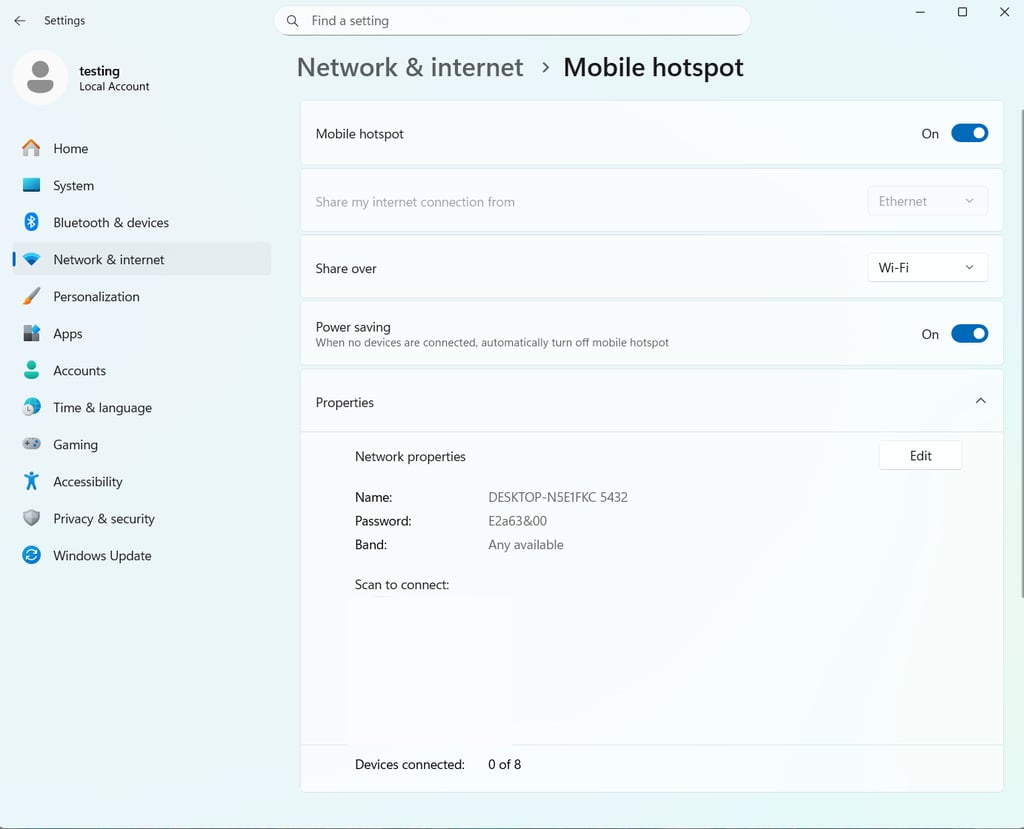
Go to Settings > Network and Internet > Mobile hotspot. Select Wi-Fi and then enable Mobile hotspot

-
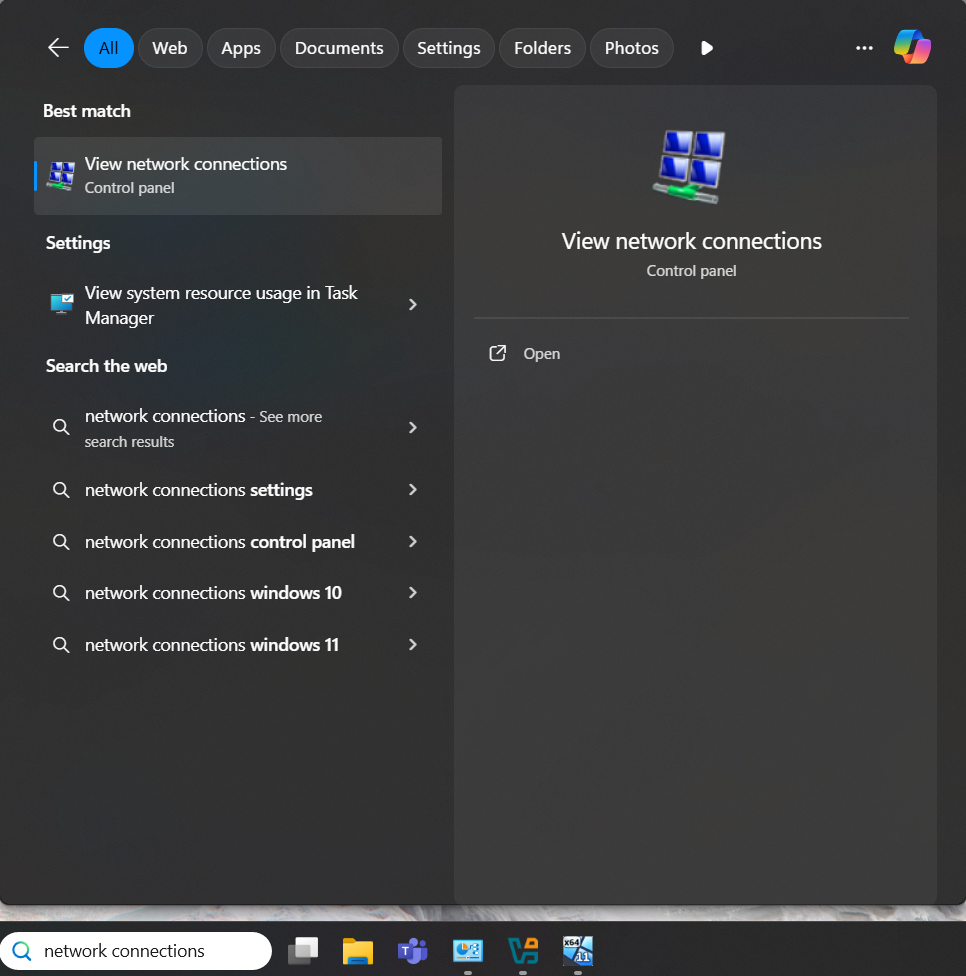
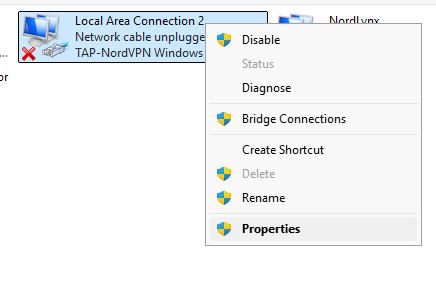
Use the search tab to look up View Network Connections. Click on it to find network adapters

-
Right-click on [VPN name] Windows Adapter and select Properties

-
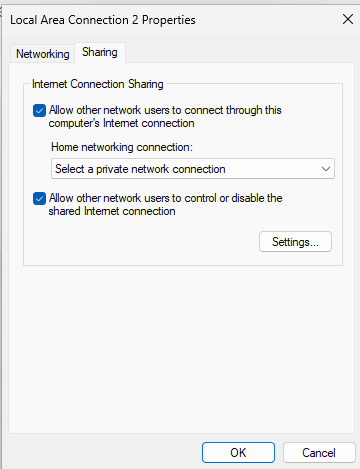
Select the Sharing tab and check the Allow other network users to connect through this computer’s internet connection box (select the hotspot you created in the drop-down menu above the adapter tagged as Microsoft Wi-Fi Direct Virtual Adapter)

How to use Smart DNS with Roku
A SmartDNS is a feature that uses specific DNS (Domain Name Servers) to access geo-restricted content. It routes only some parts of your traffic through its servers, so your internet speed is not affected as it would be with a VPN. Here’s how to set up SmartDNS for Roku:
- Go to your router’s dashboard and find the DNS settings
- From your VPN provider, get two DNS server addresses from the country with the geo-blocked streaming service
- Input those DNS server addresses in the designated fields
Using a free VPN with Roku
There are some VPNs out there that offer free services. However, I don’t recommend using a free VPN for Roku, simply because you can’t guarantee that it will work. In my free testing, only Proton VPN, which has both free and paid versions, worked with Roku and could unblock streaming services.
Further, free VPNS usually aren’t compatible with routers. Many completely free VPNs also pose a security risk – they tend to collect and sell user data.
Final thoughts
Based on my tests, NordVPN is the best VPN for Roku in 2026. It is the easiest to set up on a router, and also includes SmartDNS for even easier restricted content access. It is my favorite also because of its excellent speed and affordable pricing. If streaming anything from anywhere in the world is what you’re looking for, NordVPN is the best choice.
FAQ
Can you put a VPN on a Roku?
No, you cannot put a VPN directly on a Roku device as it is not compatible with VPN apps. To use a VPN with Roku, you must install the VPN on your router, share a VPN connection from your computer's Wi-Fi hotspot, or use the VPN's SmartDNS feature (if available).
How to change your location on Roku?
You can change your location on Roku by setting up a VPN on your router, sharing a VPN connection via a Wi-Fi hotspot from your computer, or using a VPN's SmartDNS feature. This allows you to bypass geo-restrictions and access content from a different region.
Which VPN is the best for Roku?
NordVPN is the best VPN for Roku, offering easy router setup and SmartDNS, excellent speeds, and affordable pricing.